Golden Coin Probability Calculator
©1996-2013 Roedy Green, Canadian Mind Products
To view this page, you should have the most recent Java installed
32-bit
JRE (
Java Runtime Environment)
1.7.0_21. Older versions
have a security flaw.
This Applet will run online in your browser, but it is a hybrid you
can also download, install and run it on your own machine as standalone
application. It will start and run faster if you do that. It will also
work safely even if you have disabled Java in your browser.
This Applet, on the surface is very simple. It calculates your odds of getting N heads in a row tossing a coin. It
also works when the coin is weighted. The same math also applies to anything you repeat over and over with the same
odds. For example, what are you odds of escaping nuclear war for 80 years given the odds of escaping it one year.
What are your odds of avoiding an earthquake for 90 years given the odds of having an earthquake in a given year.
Using the probability enformation in the HIV Safe Sex tables, It can compute
your odds of getting AIDS (Acquired Immuno-Deficiency Syndrome) given what you do and how often you do it.
The Myth Of the Golden Coin
Mankind does a number of things that amount to what the people in this mythical kingdom do. Every year the people
gather and toss a large golden coin. The coin is heavily weighed to come up heads. If it comes up heads all is well
for yet another year. However, if it ever comes up tails, the people explode all their nuclear weapons, release all
their biotoxins and nerve gases, and their secret weapons and kill everyone. You can use the Applet below to see
roughtly how long this civilisation lasts given how weighted the coin is.
Under Construction
How to Use the Applet
Mathematician talk of probabilities rather than odds. If a coin every single time came up heads without fail
because it was designed to, we would say it came up heads with probablity 1. If it
came up tails every single time, we would call that probability 0. If it came up heads
helf the time (a true coin), we would call that propability .5. If the coin came up
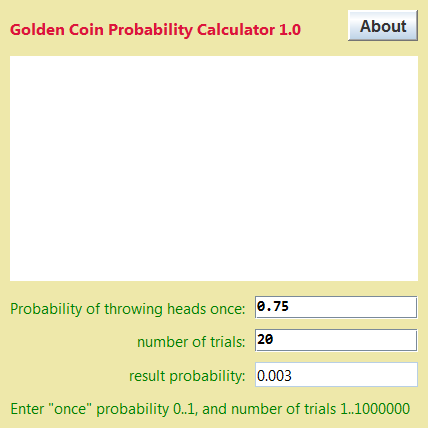
heads ¾, then we would call than probability .75. Let’s say you entered .75 in the box labelled
probability then entered 50 which means you are interested in the odds of
getting 50 heads. The Applet will calculate a graph, showing you the odds of getting
heads once, twice … all the way up to 50 times. You see the plunging toward 0 as the number of trials
increases. It is realitively easy to get short strings of heads with a weighted coin, but even with that advantage,
the effect of even one failing toss ruins the odds.
Let’s do a nuclear power accident. Throwing heads means running the plant for a whole year
without it melting down. The odds are pretty good of doing this. You can estimate them by counting the number of
nuclear plants, the total number of plant-years they have operated, and the total number of meltdowns. To do the
calculation for a single plant, compute the odds of a good year as (1 - probability of plant
having an accident in a given year). Put that in the probability slot in the Applet. Then pick a number of
trials, say 90 years (the projected lifespan of some child you care about). You can
handle an accident or terrorist attack that detonates nukes, releases biowarfare, releases chemical weapons, a really
nasty industrial accident, earthquake similarly.
Independence
The formula this program uses r = pt only applies when the trials are
independent, i.e. knowing the outcome of one trial does not give you a way to predict the next. For example, you
could not use it on cicada populations since they have a regular seventeen year pattern. You could not use it for
earthquakes which have a rough cycle and aftershocks.

If, GoldenCoin, the above GoldenCoin Probability Calculator signed Java Applet (that can also be run as an application) does not work…
- Often problems can be fixed simply by clicking the reload button on your browser.
- Make sure you have both JavaScript and Java enabled in your browser.
- This signed Java Applet (that can also be run as an application) needs 32-bit (not 64-bit) Java 1.6 or later.
For best results use the older 1.7.0_17 not the latest buggy 1.7.0_21.
In the Java Control Panel, configure medium security to allow vanilla unsigned applets to run.
- You also need a recent browser.
- It works under any operating system that supports Java e.g. W2K/XP/W2003/Vista/W2008/W7-32/W7-64/W8-32/W8-64/W2012/Linux/LinuxARM/LinuxX86/LinuxX64/Ubuntu/Solaris/SolarisSPARC/SolarisSPARC64/SolarisX86/SolarisX64/OSX
- You should see the Applet hybrid above looking much like this screenshot. If you don’t, the following hints should help you get it working:
- For this Applet hybrid to work, you must click grant/accept to give it permission to allow variable look and feel.
If you refuse to grant permission, the program may crash with an inscrutable stack dump on the console complaining about AccessController.checkPermission.
- Optionally, you may permanently install the Canadian Mind Products code-signing certificate so you don’t have to grant each time.
- If the above Applet hybrid appears to freeze-up, click Alt-Esc repeatedly to check for any buried permission dialog box.
- If you have certificate troubles, check the installed certificates and remove or update any obsolete or suspected defective certificates. The only certificate used by this program is mindprodcert2013dsa.cer.
- Especially if this Applet hybrid has worked before, try clearing the browser cache and rebooting.
- To ensure your Java is up to date, check with Wassup. First, download it and run it as an application independent of your browser, then run it online as an Applet to add the complication of your browser.
- If the above Applet hybrid does not work, check the Java console for error messages.
- If the above Applet hybrid does not work, you might have better luck with the downloadable version available below.
- If you are using Mac OS X and would like an improved Look and Feel, download the QuaQua look & feel from randelshofer.ch/quaqua. UnZip the contained quaqua.jar and install it in ~/Library/Java/Extensions or one of the other ext dirs.
- If you are using Microsoft Internet Explorer 7, 8 or 9, try another browser. Seriously. Microsoft has taken great pains, over and over, to screw up Java and every other multi-platform standardisation.
- If you are using Microsoft Internet Explorer 7, 8 or 9, you must click to allow blocked content permission for Active X to run. This also gives permission to Java to run. Click the Information bar, and then click Allow blocked content. Unfortunately, this also allows dangerous ActiveX code to run. However, you must do this in order to get access to perfectly-safe Java Applets running in a sandbox. This is part of Microsoft’s war on Java. Don’t put up with it! Use a different browser.
- If you are using Microsoft Internet Explorer 9, makes sure the Java Plug-In SSV helper add-in is installed and enabled.
If it is not, try reinstalling the Java JRE.
- If you have Windows 7 64-bit
and Internet Explorer 64-bit,
in theory you can use 64-bit Java,
but I never been able to get it to work.
- Try upgrading to a more recent version of your browser, or try a different browser e.g. Firefox, SeaMonkey, Safari or Avant.
- If you still can’t get the program working click HELP for more detail.
- If you can’t get the above Applet hybrid working after trying the advice above and from the HELP button below, have bugs to report or ideas to improve the program or its documentation, please send me an email at
.
Get New Java Get New Browser

Why I wrote This Applet
When I went to UBC (University of British Columbia), I specialised in propability and statistics. There are so many astounding things you learn that
the general public never hears about. One of the first things you learn is the way things that are highly improbable
become inevitable if you risk them often enough. Humans tend to grossly underestimate the long term effects of
repeating a risky behaviour (such as having unsafe sex or maintaining arsenals of nuclear or biological weapons or
building nuclear reactors). I hope this non-emotional, mathematical approach will let people discover for themselves
how risky much of mankind’s behaviour is.| Package | Version | Released | Licence | Language | Notes | |

GoldenCoin |
1.0 |
2011-06-12 |
free |
Java |

605K
zip for GoldenCoin Java source, compiled class files, jar and documentation to run on your own machine either as an application or an Applet.
Runs on any OS that supports Java e.g. W2K/XP/W2003/Vista/W2008/W7-32/W7-64/W8-32/W8-64/W2012/Linux/LinuxARM/LinuxX86/LinuxX64/Ubuntu/Solaris/SolarisSPARC/SolarisSPARC64/SolarisX86/SolarisX64/OSX.
First install the most recent Java.
To install, extract the zip download with WinZip,
(or similar unzip utility) into any directory you please,
often J:\ — ticking off the
use folder names option. To check out the corresponding source from the Subversion repository, use the TortoiseSVN repo-browser to
access goldencoin source in repository with [Tortoise] Subversion client on wush.net/svn/mindprod/com/mindprod/goldencoin/.
After you have installed the jar, you can run it as an application. Type:
java -jar J:\com\mindprod\goldencoin\goldencoin.jar
adjusting as necessary to account for where the jar file is.
download ASP PAD XML program description for the current version of GoldenCoin.
GoldenCoin is free. Full source included.
You may even include the source code, modified or unmodified
in free/commercial open source/proprietary programs that you write and distribute. Non-military use only. |
|
|
| |
|---|
  |
available on the web at: |
http://mindprod.com/applet/goldencoin.html |
| |
optional Replicator mirror
of mindprod.com
on local hard disk J: |
J:\mindprod\applet\goldencoin.html |
 |

Please email your
feedback for publication,
letters to the editor, errors, omissions, typos, formatting errors, ambiguities, unclear
wording, broken/redirected link reports, suggestions to improve this page or comments to
Roedy Green :
 .
If you want your message, your name or email kept confidential,
not considered for public posting, please explicitly specify that.
Unless you state otherwise,
I will treat your message as a letter to the editor that I may or may not publish
in the
feedback section.
After that, it will be too late to retract it.
If you disagree with something I said, especially when sending an ad-hominem attack,
a rant composed mainly of obscenities or a death threat, please quote the offending passage
and cite the web page where you found it, tell me why you think it is wrong,
and, if possible, provide some supporting evidence.
I can’t very well fix erroneous or ambiguous text if I can’t find it. |
| Blog |
Canadian
Mind
Products
IP:[65.110.21.43]
Your face IP:[50.16.132.180] |
|
| Feedback |
You are visitor number
11. |
|