Unfortunately, Oracle has effectively decommitted Applets. This means you can no longer run the various CMP programs in a browser. You must download them and install them.
You must have the most recent Java
JRE (Java Runtime Environment) 1.8.0_131
32-bit or 64-bit. It no longer matters which browser you use.
Oracle has effectively decommited Applets, so this Applet will no longer run online in your browser, but it is a hybrid you
can also download, install and run it on your own machine as standalone
application. It will start and run faster if you do that. It will also
work safely even if you have disabled Java in your browser.
Disclaimer
This essay does not describe an existing computer program, just one that should exist. This essay is about a suggested student project in
Java programming. This essay gives a rough overview of how it might work. I have no source, object, specifications, file layouts or anything
else useful to implementing this project. Everything I have prepared to help you is right here.
This project outline is not like the artificial, tidy little problems you are spoon-fed in school, when all the facts you need are included, nothing extraneous is mentioned, the answer is
fully specified, along with hints to nudge you toward a single expected canonical solution. This project is much more like the real world of messy problems where it is up to you to fully the
define the end point, or a series of ever more difficult versions of this project and research the information yourself to solve them.
Everything I have to say to help you with this project is written below. I am not prepared to help you implement it; or give you any additional materials. I have too many
other projects of my own.
Though I am a programmer by profession, I don’t do people’s homework for them. That just robs them of an education.
You have my full permission to implement this project in any way you please and to keep all the profits from your endeavour.
Please do not email me about this project without reading the disclaimer above.
The File Find that comes with Windows is inept. It is very
slow because uses a brute force search of the entire disk. When it shows you the results
it won’t let you copy/paste them. Why else were you looking?
Your task is to write a platform independent Fast File Find. I suggest you tackle it
like this:
Create a SQL (Standard Query Language) database of all the filenames in the system.
Ask SQL to build
three indexes, by directory name, by filename and by extension.
When you get a request, analyse the wild card and convert it into a
SQL query on
those three fields. SQL will be clever and use its indexes or brute force if
necessary. In any case it will always be faster than the Windows File Find since its
database is contiguous. The directory that Windows searches can be scattered higgledy
piggledy all over the disk.
If you don’t want to use SQL,
you will need some sort of treemap/btree indexed file manager. Btrieve will let you
package their product free with your apps, but that only covers Windows.
Allow copy to the clipboard of any result with a single click, as well as the
traditional ways.
Allow launch of any of the result files with a double click, ideally support
everything in the Windows right click menu for that file type.
Now for the hard part. How do you keep your SQL
database up to date?
You could do it by brute force, just slowly and continuously scan through all
the files on the disk looking for new, renamed or deleted ones. You don’t
want to create so much I/O you become a pest. Then again you don’t want to
dawdle so that you are too far out of date.
If you can persuade the OS (Operating System) to notify you of new, renamed or updated files, you
can save considerable work. That hook would almost certainly require some
JNI (Java Native Interface) code, or an independent auxiliary C program that
sent you updates via TCP/IP (Transmission Control Protocol/Internet Protocol). You might check Filemon. They
provide source for a VXD.
There is a change-tracking facility built into Win2K and Win2K also
implements a find utility that’s based on an index (database) of the disk,
using Microsoft Index Server (which comes bundled with Win2K). Windows
2000 now has a fast find
built-in. It is hopelessly slow the way it grinds away for hours building indexes
of file content that are always out of date.
If you do hook into the OS
for change notification, make sure you do your processing asynchronously. You
don’t want to tie up the universe while you update your database. Just
enqueue the work to be done later, so you don’t overload the system. Later
when things aren’t so frantic you will eventually catch up.
Now you can get a little clever. You can do lazy updates of deleted files,
procrastinating discovering and telling your SQL
database about them. Don’t bother checking if the files exist until they show up
in a result list of someone’s SQL
query. Then
at the last second check if the files still exist and update the
SQL
database accordingly. You can also discover them with a low priority background
process.
Of course, you want something that at 3 AM refreshes the
database and ensures it is not corrupt in any way and is 100%
up-to-date.
For bonus points, in your displays, mark files that are in-use, or open-for-write.
You can use File. canWrite or
some platform specific code to find files that are being read too.
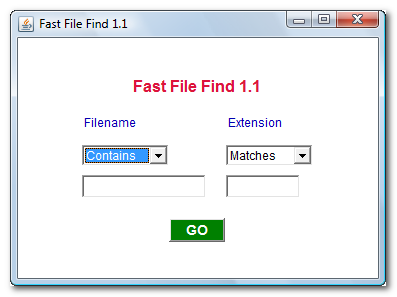
Consider a more elaborate user interface that looks something like this:
Java Requirements and Troubleshooting
FF
is a Java Applet (that can also be run as an application)
to FileFinder.
You are welcome to install it on your own website.
If it does not work…
If Copy/Paste (Ctrl-C/Ctrl-V) do not work, you can turn them back on by
modifying your java.policy file. This is not for the novice or faint of heart. instructions
Your alternative is to download this program and run it without a browser.
In the Java Control Panel security tab,
click Start ⇒ Control Panel ⇒
Programs ⇒ Java ⇒ Security, configure medium security
to allow self-signed and vanilla unsigned applets to run.
If medium is not available, or if Java security is blocking you from running the program,
configure high security
and add http://mindprod.com
to the Exception Site List at the bottom of the security tab.
Often problems can be fixed simply by clicking the reload button on your browser.
Make sure you have both JavaScript and Java enabled in your browser.
Make sure the Java in your browser is enabled in the security tab of the Java Control panel.
Click Start ⇒ Control Panel ⇒
Programs ⇒ Java ⇒ Security ⇒
Enable Java Content in the browser.
This Java Applet (that can also be run as an application)
needs 32-bit or 64-bit Java 1.8 or later.
For best results use the latest 1.8.0_131 Java.
It works under any operating system that supports Java
e.g. W2K, XP, W2003, Vista, W2008, W7-32, W7-64, W8-32, W8-64, W2012, W10-32, W10-64, Linux, LinuxARM, LinuxX86, LinuxX64, Ubuntu, Solaris, SolarisSPARC, SolarisSPARC64, SolarisX86, SolarisX64 and OSX
You should see the Applet hybrid above looking much like this
screenshot.
If you don’t, the following hints should help you get it working:
Especially if this Applet hybrid has worked before, try clearing the browser cache and rebooting.
To ensure your Java is up to date, check with Wassup.
First, download it and run it as an application independent of your browser,
then run it online as an Applet to add the complication of your browser.
If the above Applet hybrid does not work,
check the Java console for error messages.
If the above Applet hybrid does not work, you might have better luck with the downloadable version available below.
If you are using Mac OS X and would like an improved Look and Feel,
download the QuaQua look & feel
from randelshofer.ch/quaqua.
UnZip the contained quaqua.jar
and install it in ~/Library/Java/Extensions
or one of the other ext dirs.
Upgrade to the latest version of Internet Explorer or another browser.
Click the Information bar, and then click Allow blocked content. Unfortunately, this also allows dangerous ActiveX code to run. However, you must do this in order to get access to perfectly-safe Java Applets running in a sandbox. This is part of Microsoft’s war on Java.
Try upgrading to a more recent version of your browser,
or try a different browser e.g. Firefox, SeaMonkey, IE or Avant.
If you still can’t get the program working
click the red HELP button below for more detail.
If you can’t get the above Applet hybrid working
after trying the advice above and from the red HELP button below,
have bugs to report or ideas to improve the program or its documentation,
please send me an email at.
You could do this by polling directories in a
platform-independent way. Why would You want to take the clean, system-independent Java
solution and replace it with a half-dozen native implementations?
The reasons I originally wanted to write a file find to replace Microsoft’s
are:
I wanted it much faster.
I wanted it low overhead.
I wanted it up-to-date. I most often search for a file that I recently saved under
the wrong name.
Given that a Java method for a global hook in a platform-independent way to monitor
changes is not available and polling is both slow and a huge drain on resources, I see
no alternative but JNI or other native hook for an efficient implementation.
Think of it as doing Oracle’s work for them, providing the hook to everyone (who has
sufficient privilege).
One nice thing about native classes is you can add more implementations later without
disturbing existing code. JWS (Java Web Start) selects the right library for you.
FindCat
I experimented with Robert Swanson’s beta implementation of a fast file
finder called FindCat32. It sooo fast! I find myself using it far more frequently than I
ever used the Windows equivalent. It is even faster to use it to find a file than to
click to it with the Windows Explorer, even when you know exactly where it is. FindCat32
also lets you push the filename to the clipboard which saves retyping. FindCat does not
let you use wildcards, or regexes and it does not monitor file changes, but those
features may be in the pipe. It uses a fairly simple flat file structure with various
indexes.
Desktop Google has provided
a fast search, but by content, not by name.
Please read the feedback from other visitors,
or send your own feedback about the site. Contact Roedy.
Please feel free to link to this page without explicit permission.
Canadian
Mind
Products
IP:[65.110.21.43]
Your face IP:[216.73.217.135]


 .
. Get New Java
Get New Browser
Get New Java
Get New Browser