The mini PAD (Portable Application Description) Submitter is for submitting PAD files to public submission sites. A PAD files contains contact information about the author, details about a program you wrote for sale and its price. It can also describe a free program. The Mini Pad Submitter applet below will submit your PAD to 66 PADsites where to let the public know about your program and where to get it. The advantages of Mini Pad Submitter over other similar programs are:
There were at one time over two hundred hassle-free PADSites, but they have, one by one, gone out of business. I think part of the problem is the new ASP (Association of Shareware Professionals) centralised control of PADs (Portable Application Descriptions) has removed competition.
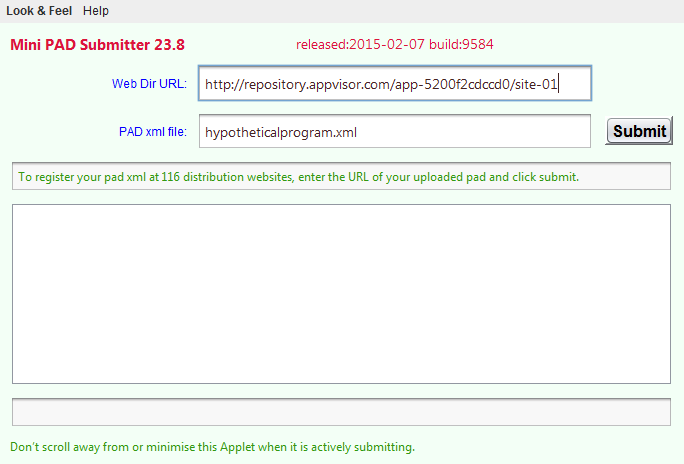
If you are submitting a PAD 4.0 hosted at AppVisor you would put something like: http://repository.appvisor.com/app-5200f2cdccd0/site-01 in the top box and something like: Aquarium_Sand_Depth_Calculator_pad.xml in the bottom.
If you are submitting a PAD 3.11 hosted on your own site, you would put something like: http://abc.com/pad in the top box and something like: aquarium.xml in the bottom.
The key thing to understand is your pad must already be posted on the web. PadSites want to know where it is available now and in future on the web, not just on your local hard disk.
To resubmit, submit to only selected sites, or submit without using a browser, download Submitter and use the companion SubmitBatch program.
 .
. Get New Java
Get New Browser
Get New Java
Get New Browser

See this list of response codes to interpret the results.
If you turn on the Java console, you can view the log of how the various websites responded. Normally you just get to see them until you submit another PAD.
You can also manually submit to this list of important distributors. Normally you should only have to submit only once. The website will check your PAD periodically for any changes.
If you download, there is included a batch version of the program called SubmitBatch that lets you submit a large list of PADs unattended. See the documentation on how to use it.
The pad submission sites in general are outrageously rude and go to extreme lengths to pointlessly hassle programmers trying to help them by giving them software to list. They waste programmers time with all sorts of means to defeat automation, including Captchas, proprietary category schemes, forcing the programmer to pointlessly rekey fields already in the PAD. This is insulting and demeaning and in incredible waste of time of highly skilled people. Programmers have much better things to do that play mother may I mind games. Sites demand payment. They demand back links. They defeat the point of PADs by inventing their own validation rules.
They are making money off the programming efforts of others but act like Queen Elizabeth I wanting everyone to kowtow to them. Without programmers, they would have nothing to list. They would have no visitors and no advertising revenue.
The sites the mini PAD Submitter uses are the considerate ones that don’t go out of their way to make submission difficult.
| Package | Version | Released | Licence | Language | Notes | ||
|---|---|---|---|---|---|---|---|
Mini PAD Submitter |
26.3 | 2017-03-30 | free | Java |  ❘ precis
❘ screenshot
❘ browse source repository
❘ precis
❘ screenshot
❘ browse source repository
for the current version of Mini PAD Submitter. Submit ASP PAD program description files to 66 PADsites.  4.1MB
zip for Mini PAD Submitter Java source, compiled class files, jar and documentation to run on your own machine either as an application or an Applet.
4.1MB
zip for Mini PAD Submitter Java source, compiled class files, jar and documentation to run on your own machine either as an application or an Applet.
Runs on any OS that supports Java e.g. W2K, XP, W2003, Vista, W2008, W7-32, W7-64, W8-32, W8-64, W2012, W10-32, W10-64, Linux, LinuxARM, LinuxX86, LinuxX64, Ubuntu, Solaris, SolarisSPARC, SolarisSPARC64, SolarisX86, SolarisX64 and OSX. First install the most recent Java. To install, extract the zip download with WinZip, (or similar unzip utility) into any directory you please, often J:\ — ticking off the use folder names option. To check out the corresponding source from the Subversion repository, use the TortoiseSVN repo-browser to After you have installed the jar, you can run it as an application. Type: java -jar J:\com\mindprod\submitter\submitter.jar
adjusting as necessary to account for where the jar file is. download ASP PAD XML program description for the current version of Mini PAD Submitter. Mini PAD Submitter is free. Full source included. You may even include the source code, modified or unmodified in free/commercial open source/proprietary programs that you write and distribute. Non-military use only. |
||
so I can add them to the list.
It submits to all the hassle-free sites listed below:
| PAD Sites with No Hassles | ||||
|---|---|---|---|---|
| Logo | # | Home | Submit | Notes |
 | 1. | 2 |  | |
 | 2. | Ababa | | |
 | 3. | ABCDatos | | In Spanish. |
 | 4. | ABDownloads | | Languages supported include Bulgarian, Chinese, Czech, Danish, Dutch, English, French, German, Italian, Japanese, Polish, Portuguese, Russian, Spanish, Swedish and Ukranian. |
| All | 5. | All | | nologo |
 | 6. | App | | |
 | 7. | Asked | | |
| Big | 8. | Big | | They have not customised their site with a logo. |
| Biz | 9. | Biz | | They have not customised their site with a logo. |
| De | 10. | De | | In German. |
 | 11. | Download | | |
 | 12. | Download | | |
 | 13. | Download | | |
 | 14. | Download | | |
 | 15. | Download100 | | |
 | 16. | Download11 | | Ranked in the top 100. |
 | 17. | Download3 | | Ranked in the top 30. |
 | 18. | Download3 | | |
 | 19. | Download3 | | |
| Download3 | 20. | Download3 | | In French. |
 | 21. | Download3k | | In Romanian. |
 | 22. | Download4 | | |
 | 23. | Downloado | | |
 | 24. | Downloads | | |
 | 25. | Downloads2 | | |
 | 26. | Euro | | |
 | 27. | Evocero | | |
 | 28. | Fast | | |
 | 29. | Fd4a | | Ranked in the top 100. |
 | 30. | File | | Ranked in the top 30. |
 | 31. | File | | |
 | 32. | File | | |
 | 33. | Files | | |
 | 34. | Find | | |
| Find | 35. | Find | | |
 | 36. | For | | Macintosh only. |
 | 37. | Free | | |
 | 38. | Free | | |
 | 39. | Freeware1 | | |
 | 40. | Freewares | | Freeware only. |
 | 41. | Im | | You must select a proprietary category for the PAD. You can leave out the proprietary category, and it still works. |
 | 42. | My | | |
 | 43. | Planet | | |
 | 44. | Rarity | | |
 | 45. | Recovery | | |
| Ru | 46. | Ru | | In Russian. |
 | 47. | Sharewareville | | |
 | 48. | Soft | | |
| Soft | 49. | Soft | | |
 | 50. | Soft112 | | Site was off the air for a while, but it is back. |
 | 51. | Soft321 | | |
 | 52. | Softholm | | Ranked in the top 100. In Russian. |
 | 53. | Software | | |
 | 54. | Software | | |
 | 55. | Software | | |
| Spot | 56. | Spot | | They have not customised their site with a logo. |
 | 57. | Standalone | | |
| Style | 58. | Style | | They have not customised their site with a logo. |
 | 59. | Swdb | | |
 | 60. | Telecharger | | In French. |
| Tera | 61. | Tera | | They have not customised their site with a logo. |
 | 62. | Two | | Not recommended. MalwareBytes says it is malicious. They bar you if you submit a PAD more than once, even if it has changed. |
| Web | 63. | Web | | They have not customised their site with a logo. might not really be a padsite, even though it has pad submit form |
 | 64. | Windows10 | | Windows 10 only |
 | 65. | Yankee | | Ranked in the top 100. |
 | 66. | ZDown | | |
 |
This page is posted |
http://mindprod.com/applet/submitter.html |
Optional Replicator mirror
|
J:\mindprod\applet\submitter.html | |
 |
Please read the feedback from other visitors,
or send your own feedback about the site. Contact Roedy. Please feel free to link to this page without explicit permission. | |
| Canadian
Mind
Products
IP:[65.110.21.43] Your face IP:[216.73.216.37] |
| |
| Feedback |
You are visitor number | |