


In Java you can paint with fully or partially transparent colours. It will greatly help your intution if you first think first about painting on glass, as a medieval artist might have done to create a stain glass window prior to putting it in a kiln to fuse the pigments. Let’s say you put some yellow opaque pigment on the glass. You could overpaint it with red opaque pigment and the final result would be red and opaque. You could overpaint clear glass with a transparent green pigment. The result would be a pale green transparent wash. You could overpaint it with red opaque pigment and the final result would be red and opaque. If you overpainted transparent green pigment on red opaque, it would not become transparent and green. It would remain red with a tinge of green. If you had accidentally applied opaque pigments, there is no way you could turn the glass transparent again by applying still more pigments transparent or opaque. You would need to somehow scrape the pigments off or avoid spilling the paint in the first place.
I helps to understand how Java paints under the hood. Many of its behaviours will then seem of course rather than baffling. When you draw for the screen, Java maintains an array of pixels, a set of numbers, where each number encodes 256 levels of red, green and blue. When you paint with fillRect, drawString etc., Java replaces pixels in the buffer with new values. Unlike physical paint, there is no record of what the old values used to be. You don’t build up many layers of old paint. The new painting replaces whatever paint was there before in the spots you paint. There is thus no way to undo painting, other than by painting over top with opaque colours or by starting the entire painting all over. When you paint with transparent colours, it computes the net effect of the transparent colour over what was there before. It does not simply replace what was there before with the new colour. All record of precisely what was there before is lost. The resultant colour can be transparent, opaque or something in the between. You start with whatever was underneath the painting and gradually paint over it. For many years I was under the delusion you effectively created an image, with each pixel having a transparency. Only when it was done would it be applied to the current background. I figured that I could simply paint with transparent black to make opaque parts of the image transparent again. I was wrong.
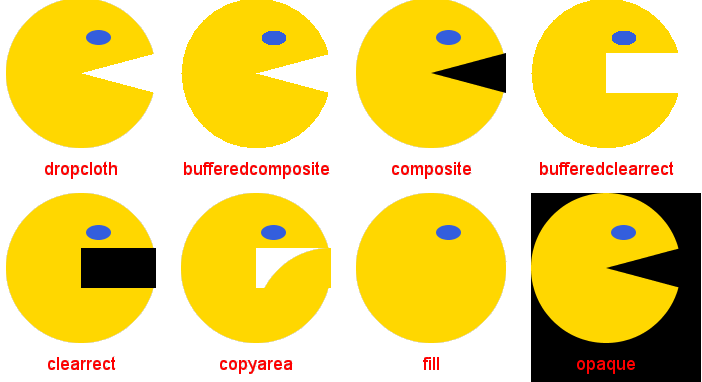
Imagine painting a Pacman. If you paint with opaque colours on a black background, you can do this quite simply by drawing a yellow circle, then overlaying a black triangle for the mouth. The black erases and replaces the yellow. The triangle will work, even without a curved edge, even if it is too big. However, if you want a Pacman on a transparent background, it is not so easy. You can’t turn yellow opaque back to transparent in any simple way. There are a number of techniques to solve the problem. The best is what I call dropcloth where you create a clip region to protect the mouth region from ever getting any yellow paint on it.
The following program will draw a Pacman on a transparent background eight ways. None are perfect, but drop-cloth comes close. Read the source code to understand how they each work. Drop cloth’s trick to creating a clip region with holes is to use Area.subtract.
 |
This page is posted |
http://mindprod.com/jgloss/transparent.html |
Optional Replicator mirror
|
J:\mindprod\jgloss\transparent.html | |
 |
Please read the feedback from other visitors,
or send your own feedback about the site. Contact Roedy. Please feel free to link to this page without explicit permission. | |
| Canadian
Mind
Products
IP:[65.110.21.43] Your face IP:[216.73.216.223] |
| |
| Feedback |
You are visitor number | |