.
. Get New Java
Get New Browser
Get New Java
Get New Browser

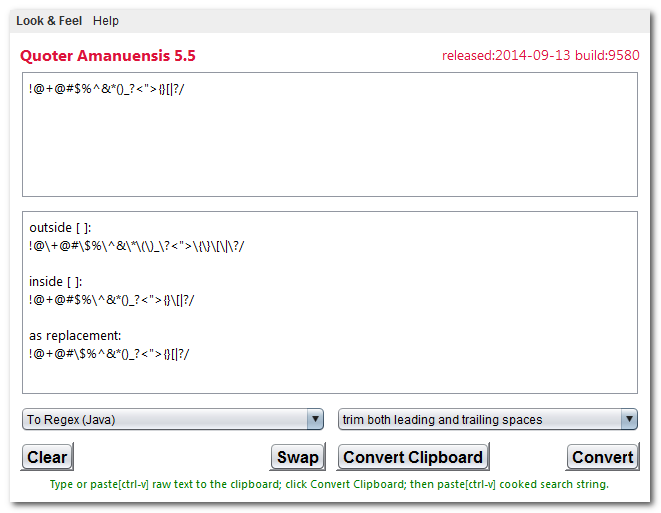
Just paste the raw text into the upper window, click Convert then copy the converted cooked text from the lower window.
You can probably best understand the Applet by typing sample text in the upper window, and looking what happens to it when you select various options.
If you want to cascade several transformations to the same piece of text, click Swap to put the output back into the input box and hit .
Try pasting in the string ! " # $ % & ' ( ) * + , - . / 0-9 : ; < = > ? @ A-Z [ \ ] ^ _ ` a-z { | } ~ and try out the various transformations to see what they do.
The amanuensis is also available with Java source to download. When you run Quoter Amanuensis as an application, it is even more automatic. You don’t need to do any manual pasting and copying. Just click Convert to convert the current contents of the clipboard. The cooked HTML replaces the old the raw text clipboard contents. This automatic feature is not available in the Applet version because the Applet sandbox considers it a security risk.
| Package | Version | Released | Licence | Language | Notes | ||
|---|---|---|---|---|---|---|---|
Quoter Amanuensis |
5.5 | 2014-09-13 | free | Java |  ❘ precis
❘ screenshot
❘ browse source repository
❘ precis
❘ screenshot
❘ browse source repository
for the current version of Quoter Amanuensis. Converts text with 23 possible cleanups, including preparation of HTML and Java, aligning in columns, character set conversion, case converting, removing excess white space, removing blank lines, preparing regex expressions…  1,365K
zip for Quoter Amanuensis Java source, compiled class files, jar and documentation to run on your own machine either as an application or an Applet.
1,365K
zip for Quoter Amanuensis Java source, compiled class files, jar and documentation to run on your own machine either as an application or an Applet.
Runs on any OS that supports Java e.g. W2K, XP, W2003, Vista, W2008, W7-32, W7-64, W8-32, W8-64, W2012, W10-32, W10-64, Linux, LinuxARM, LinuxX86, LinuxX64, Ubuntu, Solaris, SolarisSPARC, SolarisSPARC64, SolarisX86, SolarisX64 and OSX. First install the most recent Java. To install, extract the zip download with WinZip, (or similar unzip utility) into any directory you please, often J:\ — ticking off the use folder names option. To check out the corresponding source from the Subversion repository, use the TortoiseSVN repo-browser to After you have installed the jar, you can run it as an application. Type: java -jar J:\com\mindprod\quoter\quoter.jar
adjusting as necessary to account for where the jar file is. download ASP PAD XML program description for the current version of Quoter Amanuensis. Quoter Amanuensis is free. Full source included. You may even include the source code, modified or unmodified in free/commercial open source/proprietary programs that you write and distribute. Non-military use only. |
||
 |
This page is posted |
http://mindprod.com/applet/quoter.html |
Optional Replicator mirror
|
J:\mindprod\applet\quoter.html | |
 |
Please read the feedback from other visitors,
or send your own feedback about the site. Contact Roedy. Please feel free to link to this page without explicit permission. | |
| Canadian
Mind
Products
IP:[65.110.21.43] Your face IP:[216.73.216.242] |
| |
| Feedback |
You are visitor number | |