The CurrCon Java Applet displays prices on this
web page converted with today’s exchange rates into your local international currency,
e.g. Euros, US dollars, Canadian dollars, British Pounds, Indian Rupees…
CurrCon requires an up-to-date browser
and Java version 1.8, preferably 1.8.0_131.
If you can’t see the prices in your local currency,
Troubleshoot. Use Firefox for best results.
Keyboards come in two main types, clicky/stiff touch and silent/soft touch. You have to try both to see which
you prefer. If you don’t already touch type QWERTY, you might want to consider learning the modern
DSK layout instead. That article also talks about the ergonomic Kinesis
keyboards. Computers usually come with very low quality keyboards. Spending even $10 extra on the keyboard will greatly enhance your enjoyment. Keys that stick down or keys
that don’t register when you hit them can drive you nuts.
Microsoft brand keyboards come with an extra key, decorated with a Windows logo, called the Windows Key. If your keyboard does not have one, you can hit Ctrl+Esc
instead.
Black or grey keyboards have the practical advantage of hiding grime. You still have to clean them to get rid
of grit and hair that will interfere with the key action.
Ideally every key should have a slightly different shape so your fingers can subliminally tell if they are
hitting the correct key. I have conjectured that putting Braille on the keycaps would increase accuracy. At the
very least the two home keys should have some sort of distinct shape, a raised dot or bar, or a depression so you
can tell when your fingers are properly positioned over home row.
Be very careful not to spill coffee on your keyboard, especially coffee with cream and sugar. You can usually
revive a desktop keyboard splashed with black coffee with standard cleaning and drying techniques. You will
likely need a whole new laptop if you spill its keyboard with cream and sugar.
Laptop keyboards are fragile, have poor feel and are cramped. I think the designers should drop the numeric
keypad to reduce the number of keys across and add an extra row of rarely used keys across the top, or use a
layout such as the Kinesis. There is plenty of room vertically for extra keys. One way to get around the quality
problem is to use a lightweight aux keyboard you plug into a USB (Universal Serial Bus)
port.
Replacement keyboards cost from
to
Canadian. If the one you are using offends you, throw it out and get another.
I don’t know how they do it, but the Chinese manufacture keyboards for the major companies for
$5 each.
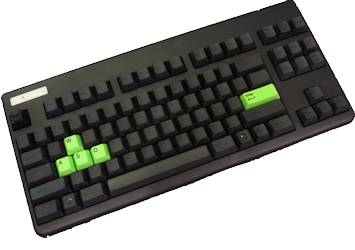
Realforce 87U
This is the Rolls Royce of keyboards. It uses Topre silent mechanical switches, with variable weighting:
30g, 45g and the Esc key is 55g.
They come in many layout variations and key colours. It is hard to find sources. It has only 60 keys compared with the usual 101.
Keyboard Size
How big should a keyboard be?
If it has to be portable, it needs to be small and light. It has to fit on your limited desk space.
If it has a lot of extra keys, such as numeric keypad, extra arrow pads etc. that you don’t use, it
will mean you have to move your right hand further to grab the mouse.
There are two styles of keyboard, with the left and right hand keys immediately adjacent and ones where
they are separated by 16.51 cm(6½ in)
or more. Separation means your wrists rest at a more natural angle.
Very thin keyboards have no room or key travel. A key feels the same whether you are just resting on it, or
pressing it. Most people cannot type as quickly without the feedback of from travel and resistance impossible
on an ultra thin keyboard.
Connections
There are both corded and wireless keyboards:
old corded AT (Advanced Technology) large round connector. Now rare.
corded PS2 small round connector.
corded USB connector (most common).
Blue Tooth wireless to built-in receiver in the computer.
Blue Tooth wireless to bluetooth dongle in computer. (complex to set up).
Logitech wireless universal dongle. Can share dongle with a mouse.
The corded versions are more reliable and easy to set up. They do not need batteries. They usually have more
lights since the lights are powered by the computer, not by batteries. Corded versions work during boot up.
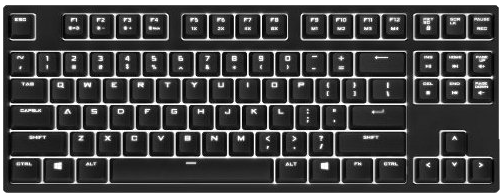
Compact Keyboards (no numeric pad)
Ideally you don’t want a numeric
keypad. Without the keypad the keyboard is considerably narrower. The means you don’t have to stretch to
reach the mouse. This saves shoulder strain. Most people never use the numeric keypad. You can buy a detachable
keypad you can move out the way when you are not using it. Such narrow keyboards are hard to find at retail
outlets.
The ErgoDox EZ is an
IndieGogo crowd sourced fully assembled very compact keyboard costing
. It comes in two independently positionable pieces. You can program the
function of every key independently. Does not support macros. Uses Cherry MX mechanical switches (blue, black, clear or red). The keycaps come without
labels. It is somewhat like the Kinesis, but all keys are on the same
plane, not mounted in dishes. It is based on the open source ErgoDox design that comes as a kit. It can be
arranged as a tent.
The IBM (International Business Machines)
spacesaver model gets rid the numeric keypad with most people never use, thus making the keyboard more compact.
The original IBMAT
83-key keyboards with the function keys on the left, were more compact, but are now collectors items and command
high prices as do most of the older keyboards. The Unicomp spacesaver retains the numeric keypad.
IBM
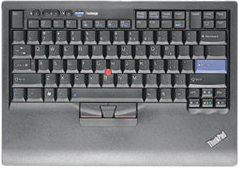
then later, Lenovo made the Spacesaver II Trackpoint with 88 keys. These are sometimes called
IBM
SpaceSaver keyboards. They have a nice compact layout, but not the clicky touch of the true
IBMs (International Business Machineses). They are usually black with a little red knob
between the G and H keys. Compaq also makes a keyboard they call the SpaceSaver, but it has a quite large
footprint with a full numeric keypad.
Usually compact keyboards are wireless. To make them work, you must insert a tiny receiver into one of your
USB ports. These things have quite a range. If
there are other computers in the same vicinity, what you type may also show upon their screens too. It you buy
only Logitech Unifying Receiver products, it is possible to configure every mouse and keyboard in your home to
different channels so they do not interfere. In general, some of the receivers work with some of your wireless
devices. They all look alike and you accumulate a bagful of them over the years. The industry still has not got
their act together on how to automatically avoid interference. Even with Logitech, it can be quite a production
to configure. Also consider that using a wireless keyboard makes it easy for amateur spies to monitor everything
you type including passwords. All it takes is a $10 device that looks like a
charger plugged in nearby logging all your keystrokes. A high quality keyboard uses encryption to defeat this
technology.
Shopping for Compact Keyboards
These compact keyboards are in ascending order by list price. This approximates the order of street price.
$15.98
electronic link to Gmyle Super Slim USB 2.0 Mini Keyboard
recommend electronic⇒Gmyle Super Slim USB 2.0 Mini Keyboard
asin
B0046L5CZ2
Small inexpensive, compact keyboard
Online electronic stores carrying Gmyle Super Slim USB 2.0 Mini Keyboard
Greyed out stores probably do not have the item in stock
$21.99
electronic link to Logitech K360 Wireless White Keyboard
recommend electronic⇒Logitech K360 Wireless White Keyboard
asin
B004ZKXXAK
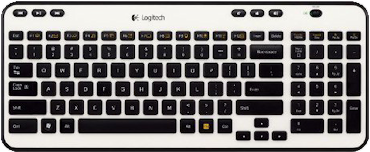
The fashion in keyboards is to use dark colours so they will not show the dirt. This inexpensive keyboard is ivory. Stores don’t let you take keyboards out the box to try, so I can say nothing about its feel.
Online electronic stores carrying Logitech K360 Wireless White Keyboard
Greyed out stores probably do not have the item in stock
$29.99
electronic link to Solidtek Mini Keyboard, KB-595BU
recommend electronic⇒Solidtek Mini Keyboard, KB-595BU
asin
B000H3ANV6
Model KB-595BU. Very compact. 88 keys. USB. There is also a BlueTooth and PS/2 version. It is 29 cm(11.3 in) wide. Comes is black and cream. Keys are normal size though shift and enter and small. Almost mechanical feel.
Online electronic stores carrying Solidtek Mini Keyboard, KB-595BU
SGK-4000-GKCM1-US. This keyboard has the legendary Cherry keyswitches, the silent brown style. Also available in Cherry blue and red style. This is a compact layout that makes mouse use easier since the mouse is closer to the home position. details.
SGK-4000-GKCL1-US. This keyboard has the legendary Cherry keyswitches, the clicky blue style. Also available in Cherry red and brown style. This is a compact layout that makes mouse use easier since the mouse is closer to the home position. details
Greyed out stores probably do not have the item in stock
$118.95
electronic link to Matias Mini Quiet Pro for PC Mechanical Keyboard
recommend electronic⇒Matias Mini Quiet Pro for PC Mechanical Keyboard
asin
B00D3BTMRU
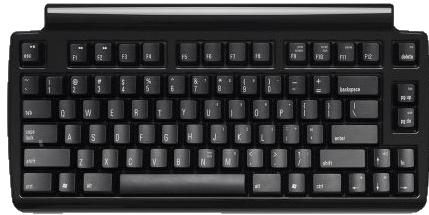
This is a very compact mechanical keyboard with a clicky feel but that has been silenced somewhat. It is still not as silent as say a laptop or membrane keyboard. By eliminating the numeric pad, your mouse is closer. Further the size is reduced making it more portable. It uses a USB connection, not wireless. Specs.
Online electronic stores carrying Matias Mini Quiet Pro for PC Mechanical Keyboard
Greyed out stores probably do not have the item in stock
$149.00
electronic link to Microsoft Ultimate Keyboard
recommend electronic⇒Microsoft Ultimate Keyboard
asin
B000H12IAC
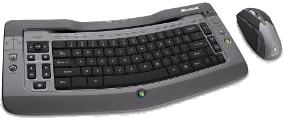
The Microsoft Wireless Entertainment Desktop 7000, aka Ultimate Keyboard, has no numeric keypad. Microsoft makes the Ultimate Keyboard that has a compact layout and is rechargeable and cordless. I don’t know what the feel is like. One retailer refused to let me take the keyboard out the box to let me test it. I can’t imagine anyone buying a keyboard without testing the feel first. It comes with a mouse, rechargeable batteries and a blue tooth hub. At the right hand edge of the keyboard are three gizmos, but still much narrower than a full numeric pad.
Online electronic stores carrying Microsoft Ultimate Keyboard
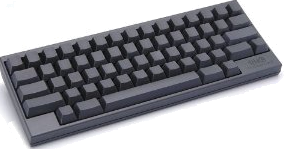
The unusual feature of this keyboard is the keys have no legends. It forces you to 100% touch-type. It also lets you create alternate layouts without misleading legends. Very compact because it has no numeric keypad. Preposterously expensive. High quality capacitor-style Topre keyswitches. It reduces the typical 104 keys down to 60. There is also a lite version for ¼ the cost. The silent version is considerably more expensive.
Greyed out stores probably do not have the item in stock
$319.00
electronic link to Kinesis KB600 Advantage2
recommend electronic⇒Kinesis KB600 Advantage2
asin
B01KR1C5PY
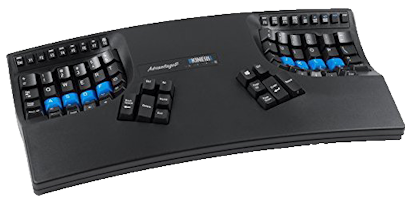
Cherry MX Brown Tactile Low-Force Key Switch, QWERTY keycaps, PC or Mac, SmartSetTM Programming Technology, can download/upload keyboard programming. Cherry ML function keys. Supports 100 macros of 200+ characters. Can be configured for the Dvorak layout, but does not come with dual DSK/QWERTY keycaps. The function keys have proper Cherry switches, but they are smaller than regular keys. specs.
Greyed out stores probably do not have the item in stock
$339.00
electronic link to Kinesis Advantage2 QD Keyboard for Dvorak Typists
recommend electronic⇒Kinesis Advantage2 QD Keyboard for Dvorak Typists
asin
B01KBKFT7C
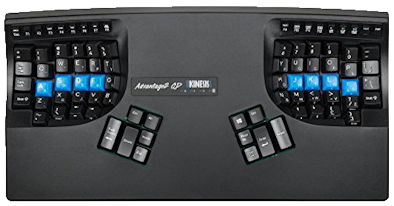
Cherry MX Brown Tactile Low-Force Key Switch, QWERTY/DNSK keycaps, PC or Mac, SmartSetTM Programming Technology, can download/upload keyboard programming. Cherry ML function keys. Supports 100 macros of 200+ characters. The function keys have proper Cherry switches, but they are smaller than regular keys. All your custom layouts are saved and stored as *.txt files directly to the keyboard. These files can be opened with any text editing program, on any operating system. specs.
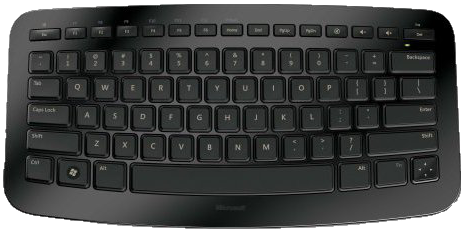
Remarkably small. Works on PC or Mac. Wireless to USB. Uses non-standard rocker key in bottom right corner instead of four arrow keys. Silent. Much cheaper in Canada than in the USA. Quite compact. The keys are smaller than usual. This will interfere with touch typing, especially if you have big hands. Uses a scissor key mechanism which is quiet and durable, but without the same satisfying feel of mechanical keyboards. Specs.
Online electronic stores carrying Microsoft Arc Compact Keyboard
Greyed out stores probably do not have the item in stock
IBM
Clicky Keyboards
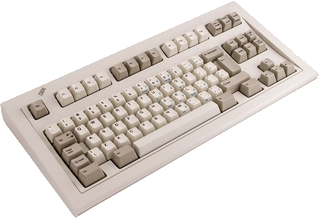
IBM Model M SpaceSaver
IBM Model M SpaceSaver
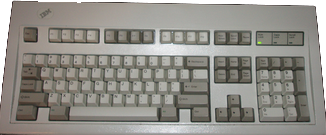
IBM Model M
IBM Model M
IBM
Model M keyboards are in a class by themselves. They use a mechanical flapper plate for deep stroke, loud click
and shock absorbers for your fingers. If you like your keyboards to fight back with strong resistance, more like
a manual typewriter, you will like these. They are heavy, about 3.18 kg(7 lbs). Don’t ever take a buckling spring keyboard apart, other than to pop the keycaps
for cleaning. You will never get it back together again. If you key in a room with other people, they might not
like the clatter. I find it useful feedback. They were manufactured by IBM, later Lexmark and later Unicomp.
Most modern keyboards have a USB
connector. Older keyboards use a small round PS/2 6-pin mini-DIN connector. Even older
ones use a large round 5-pin DIN (Deutsches Institut für Normung/German Institute for Standardisation) connector. Before you buy, factor in the cost of the various converters
you may need. Make sure the converters are designed to provide extra power to the older style keyboards.
Rocketfish keyboards are not
as clicky as IBM
’s, but they are considerably more clicky than most. Logitech keyboards are slightly more clicky
than average.
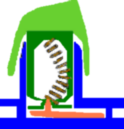
IBM’s buckling spring key mechanism
IBM’s buckling spring key mechanism
The key to IBM
’s feel, is a mechanical buckling spring. When you press the key, the spring buckles, flipping a plate
closer to the base. This changes the capacity of a capacitor embedded in the base. The change is electrically
detected. There are no actual contacts to corrode.
IBM
Model M Clicky 101-key Keyboard dimensions
IBM
Model M Clicky 101-key Keyboard Dimensions
width
48.89 cm(1.60 ft)
height
20.95 cm(8¼ in)
depth lowest point
1.90 cm(¾ in)
depth highest point
3.81 cm(1½ in)
Weight newer Lexmark (blue label)
2.27 kg(5 lbs)
to 2.49 kg(5½ lbs)
Weight older (1985—1992)
IBM
(white label)
2.49 kg(5½ lbs)
to 2.72 kg(6 lbs)
Gaming Keyboards
Gaming keyboard such as the
Razer Tarantula have a number of features that can be useful to non-gamers as well.
Compact size
Durability. Durability is more important than you think. If you have to buy a replacement keyboard and it
is not identical to your old one, it will be several months before you are up to full speed again.
Lightweight
Anti-ghosting the ability to hit a number of keys in rapid succession without
letting go of each key before hitting the text.
Ultrapolling detecting your keypress instantaneously without any delay.
Customisable keycaps
Gold plated connectors for solid electrical connections even if you keep plugging and unplugging your
keyboard.
Keyboard Design Principles
If I were to design a keyboard from scratch, here are the principles I would employ:
Y(es) and N(no) should be on separate hands so it is difficult to hit the wrong key.
The most prime real estate is the centre home row. The next is the home row. The next is the row above
that. The next is the row below the home row. Basically you assign the most used keys to the most prime real
estate.
Keys you most often use with the mouse should be on the extreme left of the keyboard, (or on the right for
the left-handed version). I would have dedicated Copy (Ctrl-C), Paste (Ctrl-V) and Cut(Ctrl-X)
Like the DSK (Dvorak Standard Keyboard)
layout I would put vowels on the left and common consonants on the right, so that you usually alternate hands
as you type.
Like the DSK
layout, I would be the T and H keys side by side so you can
type the pair with a single rolling motion. I would research if there are other such pairs.
Up/Down, Left/Right, PgUp/PgDn
and Home/End should be placed side by side so you can home in by fluttering two
adjacent fingers.
Like the Kinesis and Maltron, the thumbs should have something more to do, with oversize keys. There is no need
for a full-size space bar.
Vestigial function keys, could be placed in the mid region or across the top. They could be small, but
should have the same feel as the main keys.
It should have the solid feel of a Cherry switch, with some click. You might offer a silent version.
Whatever feel/click is researched for highest speed/accuracy should be made available and I would be willing to
get used to it.
The left and right keys would be separate by a unusually wide space so that your arms rest straight
forward, rather then pigeon-toed in.
The plane of the keypad would be tilted at 45° so that you don’t have
to twist your wrists. This is a compromise with the SafeType Vertical
Keyboard. You can still get some support from heavily-padded, easy-to-clean wrist rests.
The key placement and possibly even the key size, would account for the differing lengths of the fingers,
dished like the Kinesis keyboard.
There needs to be a way to generate any accented character without additional software, so this feature
will work in any program. This is intended for casual foreign language use. There are a set of accent dead keys
in the central area. You have three modes: E.g. when you hit dead-´ e it types
either é in direct mode, é in
HTML (Hypertext Markup Language)
mode, or \u00e9 in Java mode.
There is a small LCD (Liquid Crystal Display)
or fluorescent display in the central area. It displays the current keyboard map. You can convert the keyboard
to various national layouts, e.g. Greek, Hebrew and this display will show the new map. The smarts to handle
all this are built into keyboard firmware no matter what the OS (Operating System)
or even if there is no OS
(e.g. when tweaking BIOS (Basic Input Output System)). Flash
ROM (Read Only Memory)
is getting dirt cheap so it is reasonable to add this level of complexity to a premium keyboard.
It should be easy to pop all the keycaps for cleaning with a blast of canned air and alcohol swab.
It should be possible to plug the keyboard into an Windows, Mac, Linux, Unix machine and go without
installing drivers. This allows a consultant to take his keyboard with him and go without help/permission of
the tech support people.
Silent Keyboards
If people complain your typing is too loud there are three approaches to mollifying them:
Get a keyboard that makes less noise.
Learn to type in a way that makes less noise.
Do something to muffle the noise.
Here are keyboards listed noisy to quiet:
original IBM mechanical keyboards with
buckling springs and Hall effect flapper plates.
Cherry blue mechanical keyswitches.
Cherry brown mechanical keyswitches.
Cherry red mechanical keyswitches.
Matias silent mini pro with mechanical keyswitches.
scissor keyswitches.
rubber dome
rubber membrane
virtual (tap a glass plate with keys projected onto it.)
The catch is, the quieter the keyboard, the crummier the feel.
Especially if you learned to type on an old manual Underwood typewriter, most of the noise of your typing
comes not from the keyboard, but from your fingers slapping the keys. Practice stroking the keys as lightly as
possible and still have them trigger. Modern keyboards need much less pressure to get them to trigger reliably
than the early computer keyboards.
I have seen a device advertised on the net that is essentially a plastic bag. You put your keyboard in it. I
doubt it would make much difference to the sound. It would have to interfere with your typing.
Programmable Keyboards
The Kinesis people are working on a new keyboard that you can program (layouts and macros) via the USB port.
The Kickstarter Das Keyboard 5Q project
lets you modify the colours the the key legends over the Internet. It uses Omron (not Cherry) mechanical switches.
You might use the colours to monitor status of a set of servers or alarm conditions. You could use the colours to warn you of incoming email from various people.
The project works out of Texas, not Germany.
Please read the feedback from other visitors,
or send your own feedback about the site. Contact Roedy.
Please feel free to link to this page without explicit permission.
Canadian
Mind
Products
IP:[65.110.21.43]
Your face IP:[216.73.216.197]


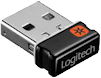 Usually compact keyboards are wireless. To make them work, you must insert a tiny receiver into one of your
USB ports. These things have quite a range. If
there are other computers in the same vicinity, what you type may also show upon their screens too. It you buy
only Logitech Unifying Receiver products, it is possible to configure every mouse and keyboard in your home to
different channels so they do not interfere. In general, some of the receivers work with some of your wireless
devices. They all look alike and you accumulate a bagful of them over the years. The industry still has not got
their act together on how to automatically avoid interference. Even with Logitech, it can be quite a production
to configure. Also consider that using a wireless keyboard makes it easy for amateur spies to monitor everything
you type including passwords. All it takes is a $10 device that looks like a
charger plugged in nearby logging all your keystrokes. A high quality keyboard uses encryption to defeat this
technology.
Usually compact keyboards are wireless. To make them work, you must insert a tiny receiver into one of your
USB ports. These things have quite a range. If
there are other computers in the same vicinity, what you type may also show upon their screens too. It you buy
only Logitech Unifying Receiver products, it is possible to configure every mouse and keyboard in your home to
different channels so they do not interfere. In general, some of the receivers work with some of your wireless
devices. They all look alike and you accumulate a bagful of them over the years. The industry still has not got
their act together on how to automatically avoid interference. Even with Logitech, it can be quite a production
to configure. Also consider that using a wireless keyboard makes it easy for amateur spies to monitor everything
you type including passwords. All it takes is a $10 device that looks like a
charger plugged in nearby logging all your keystrokes. A high quality keyboard uses encryption to defeat this
technology.