The CurrCon Java Applet displays prices on this
web page converted with today’s exchange rates into your local international currency,
e.g. Euros, US dollars, Canadian dollars, British Pounds, Indian Rupees…
CurrCon requires an up-to-date browser
and Java version 1.8, preferably 1.8.0_131.
If you can’t see the prices in your local currency,
Troubleshoot. Use Firefox for best results.
FlexeraSoftware’, née Acresso’s, née Macrovision’s,
née ZeroG’s program that lets you produce executables for installing
Java apps for a variety of platforms. The IDE (Integrated Development Environment)
itself runs on W2K, XP, W2003, Vista, W2008, W7-32, W7-64, W8-32, W8-64, W2012, W10-32, W10-64, Linux, LinuxARM, LinuxX86, LinuxX64, Ubuntu, Solaris, SolarisSPARC, SolarisSPARC64, SolarisX86, SolarisX64 and OSX
It also produces distributable executable installers for those platforms. It claims
to produce much smaller distributables that install faster than the Install Shield
competition. Further, it will also handle installing a suitable Java VM.
The following information comes from my experience with the product since
2001. Some of what I say will be be dated.
The are 14 versions. The simplest, InstallAnywhere standadard costs
. It is a snap to use. It creates a *.exe for
windows and a *.bin script for Unix (processor independent! clever eh?) and a Mac
version too if your program can run under the Mac’s Java. The installer adds
the program to the menu with an icon. The problems with the free version include:
If you ask it to install the JVM (Java Virtual Machine),
it makes a private copy. Every app gets its own copy of the
JVM.
You soon fill up your client’s disks with duplicate copies of the
JVM.
If the end user has several JVMs (Java Virtual Machines)
installed it asks the user which to use. Most end users have no clue
what to answer. You can’t configure the JVM
required at build time.
You or the user cannot independently control whether an icon appears on the
desktop, task bar, or start menu.
If you include an entire directory in the distribution, then add yet another
jar to that directory, it will not be included. You must delete the directory and
re-add it.
It does not work at all under Windows 98! I have not tested
the latest version to see if this bug has been fixed. version 6.0 could not find installed JVMs.
Even when the end user manually finds java.exe for it, it only copies some of the
necessary files to the install directory. It works fine under NT, however. Their
email robot expressed no interest in hearing about the bug. They wanted me to pay
them
for doing them a favour of reporting the bug.
You can’t specify whether included data files should override the
user’s existing files or not. They always replace.
The version 3.5 has more customisation powers, but
it is flaky. It did many strange things and then gradually stopped doing them,
without rhyme nor reason.
Even without JVM you add about 1 MB to your executable download size
and roughly the same amount to the installed executable. Ideally this overhead
should be downloaded once, not once per app.
I have exchanged many emails and phone calls with the InstallAnywhere people. I
hope they follow my advice and make the free InstallAnywhereNow more foolproof for
the end user, but limit it to tiny apps. Instead they dropped the product.
Unfortunately version 4 still gaves you no way to
control which VM your app gets connected to. Its downloads are about 200K bigger than version 3.5, a little
over a megabyte of overhead on each download, exclusive of the VM. The main new
feature of version 4 is the ability to include a jar
file that is automatically expanded as part of the install. InstallAnywhereNow does
not have a way of pre-installing the generic installer once, the way you can with Web
Start which would remove that overhead. The advantage is the downloads are totally
self-contained.
version 5 has the power
update feature similar to JNLP (Java Network Launching Protocol)
for automatically installing upgrades to your customers. The major enhancement in the
use of XML (extensible Markup Language)
files to control the installer. This product is now defunct.
I tested version 6.1. It is in some ways even worse
than earlier versions.
To include other than the Macrovision default JVM,
you must download VMPACKS from Macrovsion before you do
your builds and put them in your F:\Program
Files\InstallAnywhere 6 Standard\resource\installer_vms directory.
The Applet style install aborted three times without error message when I tried
the download of InstallAnywhere itself. The download was only partly complete. The
style where you select the platform yourself behaved normally.
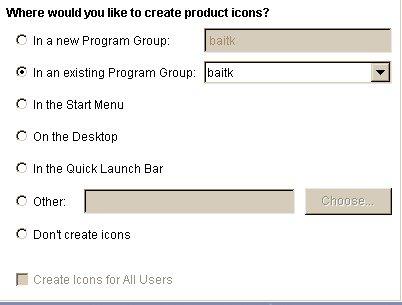
When the user installs your app in Windows, he is given a multiple choice radio
button question "where would you like to create the product icons?"
Usually he wants them all, not just one. These should be
checkboxes, not radio buttons.
ZeroG has acknowledged the problem and has logged a fix as a feature
request.
The NoVM Windows install fails, even though when the necesary
JVMs
are already installed. ZeroG acknowledges the problem and suggest either always
bundling the JVM or using a command line such as this to launch
install.exe LAX_VM C:\jre\bin\java.exe
It is not clever enough to automatically put jars you include on the classpath,
not even the one containing the main class. However, it lets you add entire
directories or entire jars to the classpath just by ticking a box. You don’t
have to compose a giant classpath yourself. You can see what it has decided to put
on the classpath in Project ⇒ Java ⇒ Classpath
Settings
Its launcher is a small C program called main.exe that
looks for a text file called main.lax which tells it
where to find the JRE (Java Runtime Environment), the name of the main class to launch and the
classpath.
Integration with Ant
The InstallAnywhere docs are wrong. They say in one place to put iaant.jar on the classpath and in another in ANT_HOME/lib/ext. Both are wrong. You supposed to put it in
ANT_HOME/lib. If you don’t, you will get a misleading
error message like this:
taskdef A class needed by class com.zerog.ia.integration.ant.InstallAnywhereAntTask
cannot be found: org/apache/tools/ant/taskdefs/ExecTask
It is actually having trouble finding com.zerog.ia.integration.ant.InstallAnywhereAntTask not org.apache.tools.ant.taskdefs.ExecTask. Don’t try putting jars
in the jdk1.8.0_131/jre/lib/ext directory. For
some reason this confounds ant so that it can no longer find the sun.tools.javac.Main class located in jdk1.8.0_131/lib/tools.jar.
Please read the feedback from other visitors,
or send your own feedback about the site. Contact Roedy.
Please feel free to link to this page without explicit permission.
Canadian
Mind
Products
IP:[65.110.21.43]
Your face IP:[216.73.216.239]