


This essay does not describe an existing computer program, just one that should exist. This essay is about a suggested student project in Java programming. This essay gives a rough overview of how it might work. I have no source, object, specifications, file layouts or anything else useful to implementing this project. Everything I have prepared to help you is right here.
This project outline is not like the artificial, tidy little problems you are spoon-fed in school, when all the facts you need are included, nothing extraneous is mentioned, the answer is fully specified, along with hints to nudge you toward a single expected canonical solution. This project is much more like the real world of messy problems where it is up to you to fully the define the end point, or a series of ever more difficult versions of this project and research the information yourself to solve them.
Everything I have to say to help you with this project is written below. I am not prepared to help you implement it; or give you any additional materials. I have too many other projects of my own.
Though I am a programmer by profession, I don’t do people’s homework for them. That just robs them of an education.
You have my full permission to implement this project in any way you please and to keep all the profits from your endeavour.
Please do not email me about this project without reading the disclaimer above.
This project lets people print birthday cards, Christmas cards and other greeting cards either on plain paper or on heavy card stock with a crease across the middle of an 21.59 × 27.94 cm (8½ × 11 in) page. Such paper is available from Hewlett Packard as Printable Expressions.Aren’t there dozens of such programs out there already? The ones I found on the net wanted money, wanted to install software or your machine, or produced cards of such inferior quality you would be embarrassed to send them. You would set this project up as a free signed Applet on a web page with a Google ad, that would generate revenue. The user does not need to install any software and gets printed cards free.
You print the card on both sides of a page and fold it over in the middle. There are thus four panels. If you make a little model of a card, you will see two of the panels must be printed upside down. (If panels 2 and 3 contain no text, you can simply feed the paper for panel 1 rightside up and the reverse side panel 4 upside down.) Java’s AffineTransform will help you do that.
| Portrait | Landscape | ||||
|---|---|---|---|---|---|
| outside | inside | outside | inside | ||
| front | blank | back | front | blank | greeting |
 |
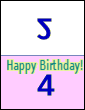 |
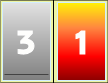 |
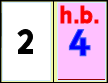 | ||
| back | greeting | back | front | blank | greeting |
| outside | inside | outside | inside | ||
The user gets to choose the fonts, sizes and colours for the various bits of text. He also gets to choose the background colour for the inside bottom page. You might allow the user to select one of several sizes. A user may need to print a slightly smaller card if his printer can’t print close to the edges of the page. A user might want small cards for gift enclosures.
Every time the user changes a selection, your program immediately repaints the three-non-blank panels. Display the panels right side up, unlike one of the birthday card sites than shall remain nameless.
You can borrow code from FontShower and Screws. You could have a selection of images and suggested greetings for the tongue-tied to select from.
When the image is satisfactory, you print it on the user’s colour inkjet printer on high quality setting, or save it as a large jpg they can then safely embed in a email to form an e-card. Use fit-to-page to maximise use of the printable area without cropping. You might cannibalise some code from Masker to do this.
A photographer could use this tool to create greeting cards with photos of local sites of interest and sell them to tourist shops. To print or to save a jpg on the user’s hard disk, you must sign your Applet.
Allow the user to print the outside and inside of the card as many times as needed, with explanation of how to insert the paper in the printer for the two printing passes. The crease gives the paper a natural outside and inside. If the user is preparing a stack of Christmas cards for example, he may elect to print all the outsides first then the insides on the backs so he does not need to hand feed each sheet.
You can use a guillotine to trim the white borders off if you like. This helps forgive any alignment imperfections and borders not exactly the same size.
If you want such a custom birthday card and have not the patience, you can create it manually with PaintShop Pro.
I have a half-completed project, a more user-friendly replacement for Java’s JColorChooser. If you tackle this project I might be spurred to complete it and give you the code.
Using Google’s free Web fonts you can greatly extend the selection of fonts available to the user.
$4.21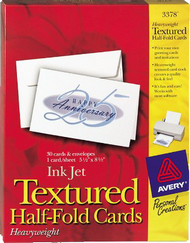 |
recommend electronic⇒Avery Textured Half-Fold Greeting Cards for Inkjet Printers, Uncoated, 03378 | |||||||||||||||||||||||||||||||||||||||||||||
| asin | B0000AQNVK | |||||||||||||||||||||||||||||||||||||||||||||
|---|---|---|---|---|---|---|---|---|---|---|---|---|---|---|---|---|---|---|---|---|---|---|---|---|---|---|---|---|---|---|---|---|---|---|---|---|---|---|---|---|---|---|---|---|---|---|
| Uncoated, textured. 8.5 x 11” white, contains 30 sheets and 30 envelopes. Considerably cheaper then the matte coated version. Weight 8.5 mil. | ||||||||||||||||||||||||||||||||||||||||||||||
| ||||||||||||||||||||||||||||||||||||||||||||||
| Greyed out stores probably do not have the item in stock | ||||||||||||||||||||||||||||||||||||||||||||||
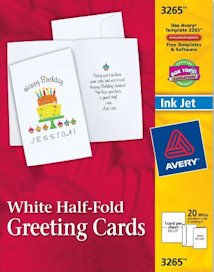 |
recommend electronic⇒Avery Half-Fold Matte Greeting Cards for Inkjet Printers 03265 | |||||||||||||||||||||||||||||||||||||||||||||
| asin | B00000JFNV | |||||||||||||||||||||||||||||||||||||||||||||
|---|---|---|---|---|---|---|---|---|---|---|---|---|---|---|---|---|---|---|---|---|---|---|---|---|---|---|---|---|---|---|---|---|---|---|---|---|---|---|---|---|---|---|---|---|---|---|
| dim | 21.59 × 27.94 cm 8½ × 11 in | |||||||||||||||||||||||||||||||||||||||||||||
| with fold, white, matte, contains 20 sheets and 20 envelopes. Weight 8.5 mil. There are many variations, size, texture, 20 to 200 packs. Tiger stock the 30 pack. Check your local stationery store. | ||||||||||||||||||||||||||||||||||||||||||||||
| ||||||||||||||||||||||||||||||||||||||||||||||
| Greyed out stores probably do not have the item in stock | ||||||||||||||||||||||||||||||||||||||||||||||
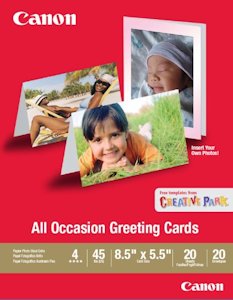 |
recommend electronic⇒Canon All Occasion Greeting Card, 0775B056 | |||||||||||||||||||||||||||||||||||||||||||||
| asin | B0014WJYNC | |||||||||||||||||||||||||||||||||||||||||||||
|---|---|---|---|---|---|---|---|---|---|---|---|---|---|---|---|---|---|---|---|---|---|---|---|---|---|---|---|---|---|---|---|---|---|---|---|---|---|---|---|---|---|---|---|---|---|---|
| 8.5 x 11” 20 sheets, 20 envelopes. Glossy photo paper. weight? | ||||||||||||||||||||||||||||||||||||||||||||||
| ||||||||||||||||||||||||||||||||||||||||||||||
| Greyed out stores probably do not have the item in stock | ||||||||||||||||||||||||||||||||||||||||||||||
Keep an eye out for house brands. They might cost 1/5 as much, but then they might smear inkjet printing.
 |
This page is posted |
http://mindprod.com/project/birthdaycard.html |
Optional Replicator mirror
|
J:\mindprod\project\birthdaycard.html | |
 |
Please read the feedback from other visitors,
or send your own feedback about the site. Contact Roedy. Please feel free to link to this page without explicit permission. | |
| Canadian
Mind
Products
IP:[65.110.21.43] Your face IP:[216.73.217.51] |
| |
| Feedback |
You are visitor number | |


