Unfortunately, Oracle has effectively decommitted Applets. This means you can no longer run the various CMP programs in a browser. You must download them and install them.
You must have the most recent Java
JRE (Java Runtime Environment) 1.8.0_131
32-bit or 64-bit. It no longer matters which browser you use.
Oracle has effectively decommited Applets, so this Applet will no longer run online in your browser, but it is a hybrid you
can also download, install and run it on your own machine as standalone
application. It will start and run faster if you do that. It will also
work safely even if you have disabled Java in your browser.
Calendar
Note the spelling. Java programmers rarely spell it correctly. This essay looks a
little different from my usual style. That is because was published in 2001 Volume 6 issue 6 of Java
Developer’s Journal.
For newbies, dealing with dates and times are the probably the most confusing
aspect of Java. There are three reasons for this:
The date and time classes are the most poorly designed of all the Sun class
libraries.
The standard class libraries force you to deal with time zone and time of day,
even when they are irrelevant to your problem.
The vocabulary used in the various date classes is inconsistent.
First, a quick review of what you probably were taught
about the calendar in elementary school.
The earth rotates every 24 hours. The sun is highest in
the sky at solar noon, once each rotation, for any given spot on the earth. Railway
schedules where hard to coordinate when towns even a few miles apart celebrated noon
at a slightly different instant in time. So, Sir Sandford Fleming invented
24 time zones, within each, time was uniform. Astoundingly,
he managed to sell the idea to the entire planet. The boundaries are essentially
meridians every 360 ÷ 24 =
15 degrees (1 hour). There are
jogs in them to accommodate political realities.
The earth rotates from west to east. This means the British see noon, 5 hours before New Yorkers who see it in turn 3 hours before the inhabitants of Seattle. London is time zone UTC:0,
New Yorkers EST/UTC-5, Seattle PST/UTC-8. In other words, to get Seattle time, you
take UTC (Coordinated Universal Time/Temps Universel Coordonné) (similar to
GMT (Greenwich Mean Time)
) and subtract 8 hours.
Anyone who has flown over the Pacific ocean to Asia has crossed the International
date line. When you cross it going west to east, the day of the week jumps ahead a
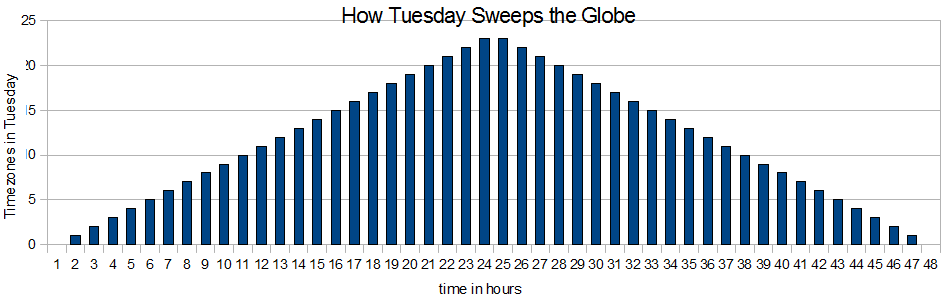
day. The planet does not simultaneously flip from Monday to Tuesday. The people
living just east of the International Date Line flip first, then an hour later the
people living 15 degrees east of that flip and finally
23 hours later the people living just west of the
International Date Line flip. So Tuesday washes over the earth like a wave.
The entire planet is never entirely on Tuesday.
During wars, politicians wanted people to get up earlier to conserve electricity
in the evening. They came up with the bizarre idea of adjusting the clocks to trick
people into compliance. This was originally called war
time, then later DST (Daylight Saving Time). It created chaos in many
ways. Part of the problem is the days for changing clocks forward and back and
whether DST
is used at all are completely non-standard. Java has to maintain giant tables to
track what each city on the planet does with DST,
and the history of what they have done in past.
The most important fact to drill into your brain is it makes no sense to ask what
day of the week a given instant in time (i.e. Java long
timestamp) is. You must ask what day of the week it was at that instant in a
particular time zone. It also depends the particular location within that time zone
was using DST
at the time. Java uses micro-time zones, usually named after cities, each of which
has a the same DST
rules and history.
The moon rotates around the earth once every 27 days and
8 hours, one lunar month (moonth), The Gregorian
solar calendar we use today uses a month of 28 to
31 days.
The earth rotates around the sun once every 365.242190
days, or one solar year. We use a system of leap years with years of either 365 or
366 days so pretend a year is an even number of days.
Human biology is synchronised to the solar day, the lunar month and the solar
year. The weirdness of our civil calendars come from trying to pretend that lunar
months and solar years are actually even multiple of days.
A highly accurate clock that monitors the frequency of light emitted by excited
atoms or even a single atom, originally cesium atoms, or clock that is accurately
synced to such a clock.
day of month
The day of the month 1..31. Sometimes called the date.
day of week
Day of the week for a given date, e.g. Sunday = 1,… Saturday = 7.
DST offset
DST
offset. The number of milliseconds correction to account for daylight saving time,
0 if daylight saving time is not in effect for the timestamp specified. If a
one-hour daylight saving is in effect, the offset will be 3600000. You add the
DST offset and
the zone offset to UTC
to get local time.
A historic time standard derived by observing the sun at the prime meridian at
the Royal Observatory, Greenwich, England. It has been supplanted by the more
stable SI (Systèm Internationale (metric))
UTC
standard based on an atomic clock.
Pope Gregory’s calendar we use today that has leap year corrections every
4, 100 and 400 years.
ISO day of week
Day of the week 1 to 7 for this date according to the
ISO-8601 (International Standards Organisation # 8601 (date/time)). Monday = 1… Sunday = 7.
ISO week number
Week number 01 to 53 of the year this date falls in, according to the rules of
ISO-8601. Week 1 of any year is the week that contains 4
January, or equivalently week 1 of any year is the week that contains the first
Thursday in January. A week that lies partly in one year and partly in another is
assigned a number in the year in which most of its days lie. Most years have 52
weeks, but years that start on a Thursday and leap years that start on a Wednesday
have 53 weeks. January 1 may well be in week 53 of the previous year! ISO specifies
a lead 0 to create a 2-digit year. Java does not do that unless you code the
display specially.
an extra day added to the year to keep the calendar in sync with the revolution
of the earth around the sun.
month of year
January to December. Note that in GregorianCalendar, January is month 0. In
contrast, in DateFormat, January is month 1.
offset
How many milliseconds difference local time is from UTC.
If you live is North America this will be a negative number. It is the sum of the
zone offset and the DST
offset. You add the DST
offset and the zone offset to UTC
to get local time.
In much of the world, people adjust their clocks to trick themselves into
getting up an hour earlier in summer.
timestamp
An instant in cosmic time, expressed in milliseconds since 1970-01-01 0:00 in UTC.
It can be a positive or negative 64-bit long number.
These are sometimes called Dates and sometimes
Times.
a region of the earth that keeps the same winter time. They may or may not all
flip to summer time at the same time and some parts may not flip at all.
A TimeZone is a Java class for a region of the earth
that keeps the same time. If they keep different time in summer and winter,
everyone is the region flips together. The TimeZone
class describes the offset from UTC
in summer and winter time and when the flips occur of a given time zone.
There are many possible definitions. The default GregorianCalendar definition depends on whether you consider Sunday
or Monday as the first day of the week setFirstDayOfWeek, (the default is locale specific) and how many
days you insist must be present in the first week of the year setMinimalDaysInFirstWeek, (default 1). The first week of the year
is week 1. January 1 may sometimes be considered week 53 of the previous year.
zone offset
milliseconds difference that local time is from UTC
if you ignore any daylight saving time correction. West of the prime meridian that
runs through Greenwich England, i.e. in west Africa and North and South America,
this will be a negative number. Also Oceania (aka Oceania) in the Pacific Ocean
east of the International Date line will also have a negative offset. You add the
DST
offset and the zone offset to UTC
to get local time.
The Cast
You need to use quite a few different classes to solve
even a simple problem involving dates.
Classes useful in date calculation
Classes useful in Date calculation
class
Purpose
com.mindprod.common18.BigDate
A simpler date class for pure date calculations when you don’t want the
complication of TimeZones and times. Not part of Oracle’s libraries. You
can download it from http://mindprod.com/products1.html#BIGDATE
java.text.DateFormat
Used to convert a date to or from a String. Contains an associated
TimeZone.
java.text.SimpleDateFormat
Used to convert a date to or from a String when you want precise control
over the format. Contains an associated TimeZone.
java.util.Calendar
Abstract class that is the mother of all Calendars such as
GregorianCalendar. It owns the dozens of magic date constants such as
Calendar. JANUARY = 0;
Calendar. SUNDAY = 1;
and Calendar. YEAR =
1.
java.util.Date
Oracle’s first attempt at a Date class. I refer to it as the lemon of
Java. It is now almost completely deprecated. It now just basically just a
wrapper around a UTC
date/timestamp long milliseconds since 1970.
Unfortunately, it is still not completely gone.
java.util.GregorianCalendar
Used to do date calculations. Each GregorianCalendar contains a
UTC
timestamp and a TimeZone.
java.util.TimeZone
Contains the name of a time zone and how many hours difference from
UTC
that time zone is. It also contains the rules for when daylight savings begins
and ends. TimeZones are named after cities. They are not the usual names.
Today’s Date
Here in how to display today’s date.
Displaying A Date
This program will convert a date to a String for display, using the default date
format. That format depends on what the user has configured as his preferred date
format in the OS (Operating System).
You can also use Formatter and printf.
ISO-8601 Date Format Rant
Java goes to great lengths to localise date formats, to display dates in the
form preferred by each locale. I think this a bad idea. Consider the following
date: 11/10/09. What does it mean? the 11th of October 1909, the 11th of October
2009, the 10th of November 1909, the 10th of November 2009, the 9th of October
2011? Everyone will interpret it differently if they see it embedded in a
globally accessible web page, especially the Wikipedia, book or magazine. And that
is just the tip of the Tower of Babel. We are a global village. We must use a
commonly understood date format and that is the ISO-8601
format yyyy-mm-dd. Thus 2011-11-02 means the 2nd of November, 2011
to everyone, unambiguously. If everyone used ISO-8601
format it is would be much easier for search engines to find things by date and to
extract data factoids, such as birth and death dates. Further, YYYY-MM-DD dates sort naturally as a simple String.
In a similar way, the hodge podge of time zones and insane
DST
rules means people are always getting confused by published dates and times. We
need to standardise on a common format to broadcast timestamps of events e.g. a
coronation, namely in ISO-8601
standard format YYYY-MM-DDThh:mmZ so that 2011-11-02T20:46Z unambiguously means the 2nd of
November 2011 at 8:46 PM UTC. Software in browsers could optionally
convert such timestamps embedded in the HTML (Hypertext Markup Language)
back and forth to local time, much the way Google Translate works, but without
necessitating any server involvement.
ISO-8601 Conformant Websites
Canadian government
publisher.appvisor.com ASP (Association of Shareware Professionals) PADs (Portable Application Descriptions)
mindprod.com
ISO-8601 Denier Websites
Wikipedia. They use hodge-podge of formats including mmmm-dd-yyyy and dd-mmmm-yyyy.
Quickbooks. They use mm-dd-yyyy.
Oracle. They use mmmm-dd-yyyy.
DateFormat: Displaying A Date With Precise Control
If you want precise control of how your date looks, you can use a mask like
this:
DateFormat Formatting Characters
DateFormat Formatting Characters
Letter
Meaning
GG
era: AD or BC
yy
year, 2 digit
yyyyy
year, 4 digit
MM
Month in year, 01-12
MMM
Month in year, Jan-Dec. Watch out! If your default locale is Locale.FRANCE
this will come out in French with accented letters.
MMMMM
Month in year, January-December. Watch out! If your default locale is
Locale.FRANCE this will come out in French with accented letters.
www
ISO-8601
week in year, 01 to 53
W
Week in month, first week is 1
DDD
Day in year. Jan-01 is day 1
dd
Day in month, 1 to 31
F
ISO-8601
day of week, a number. Monday = 1… Sunday = 7
EEE
Day in week abbreviation, e.g. Tue. Watch out! If your default locale is
Locale.FRANCE this will come out in French with accented letters.
EEEE
Day in week, e.g. Tuesday. Watch out! If your default locale is
Locale.FRANCE this will come out in French with accented letters.
aa
AM/PM indicator
HH
Hour in day (0-23), 24-hour time
kk
Hour in day (1-24), 24-hour time
KK
Hour in day for AM/PM (0-11)
hh
Hour in day for AM/PM (1-12)
mm
Minute in hour, 0-59
ss
Second in minute, 0-59
SSS
Millisecond, 000-999
zzz
Time zone abbreviation, e.g. PST (Pacific Standard Time)
zzzzzzzz
full Time zone, e.g. Pacific Daylight Time
Z
Time zone offset e.g. -0700
Oracle’s Javadoc on Complete List of SimpleDateFormat Mask Characters : available:
Here is how to display today’s date in Zulu ISO-8601
format.
Local Time
Here is how to display local time, to the millisecond.
Parsing/Validating A Date
To convert a date from a String to internal format is
quite a production. This technique will also validate a date. Just catch the
ParseException.
Notes:
Be very careful with TimeZones. If you don’t
specify one, your date will be interpreted using the local default TimeZone. If the user has not configured it correctly in his
OS, you may get
Pacific Standard time or GMT, without warning.
Elapsed Time in Years, Months and Days
Elapsed Time In Hours Between Two Timestamps
Have a look at this example program to calculate how many hours until the next
presidential inauguration.
Notes:
You specify the timestamp with
GregorianCalendar.set
in terms of Eastern Standard time, not UTC.
Internally the timestamp is stored as UTC.
You don’t create the TimeZone object with new.
The getTime().getTime() is not an error. The first
getTime retrieves a Date
object from the GregorianCalendar and the second
retrieves a timestamp from the Date object.
Elapsed time in days is not simply hours / 24. It is much more complicated than
that.
How Long Until Christmas, Daddy?
This sounds like a simple problem. Programmers posted many different solutions to
the comp.lang.java.programmer
newsgroup before the gurus stopped finding holes in the logic. Part of the problem is
that the question can have many different legitimate answers.
Taking A Timestamp Apart
Building A Timestamp from the Pieces
// building a timestamp using default TimeZone.GregorianCalendar stamp = new GregorianCalendar();stamp.clear();stamp.set(year, month-1, day, hour, minute, second );long timestamp = stamp.getTimeInMillis();
Gotchas
java.util.GregorianCalendar has far fewer bugs and gotchas than the
old java.util.Date class but it is still no picnic.
Had there been programmers when Daylight Saving Time was
first proposed, they would have vetoed it as insane and intractable. With daylight
saving, there is a fundamental ambiguity. In the fall when you set your clocks back
one hour at 2 AM there are two different instants in time
both called 1:30 AM local time. You can tell them apart
only if you record whether you intended daylight saving or standard time with the
reading. Unfortunately, there is no way to tell GregorianCalendar which you intended. You must resort to telling it
the local time with the dummy UTC
TimeZone to avoid the ambiguity. Programmers usually close their eyes to this
problem and just hope nobody does anything during this hour.
Millennium bug. The bugs are still not out of the Calendar classes. Even in JDK (Java Development Kit)
1.3 there is a 2001 bug.
Consider the following code:
GregorianCalendar gc = new GregorianCalendar();gc.setLenient(false );/* Bug only manifests if lenient set false */gc.set(2001, 1, 1, 1, 0, 0 );int year = gc.get (Calendar.YEAR );/* throws exception */
The bug disappears at 7AM on 2001/01/01 for MST.
GregorianCalendar is controlled by
a giant of pile of untyped int magic constants. This technique totally destroys any
hope of compile-time error checking. For example to get the month you use
GregorianCalendar. get(Calendar.MONTH));
GregorianCalendar has the raw
GregorianCalendar.get(Calendar.ZONE_OFFSET) and the
daylight savings GregorianCalendar. get( Calendar. DST_OFFSET), but no way to get the actual time zone offset being
used. You must get these two separately and add them together.
GregorianCalendar.set
( year, month, day, hour, minute)
does not set the seconds to 0.
DateFormat and GregorianCalendar do not mesh properly. You must specify the
Calendar twice, once indirectly as a Date.
If the user has not configured his time zone correctly it
will default quietly to either PST
or GMT.
In GregorianCalendar, Months are
numbered starting at January=0, rather than 1 as everyone else on the planet does.
Yet days start at 1 as do days of the week with Sunday=1, Monday=2,…
Saturday=7. Yet DateFormat. parse behaves in the traditional way with January=1.
Locale.setDefault
( Locale. ITALY) will not
have any effect on SimpleDateFormat objects already
created. You need to set the default Locale before
creating your SimpleDateFormat objects or use the
SimpleDateFormat constructor that takes a Locale.
Beware, in JavaScript, the parsing of dates is not properly defined. How it
works varies from browser. launch =
Date.parse("Fri, 20 Nov 1998 00:20:00
CST"); will, in Opera, for example, be interpreted ignoring the
CST, taking the default time zone instead.
Designing a Calendar
Designing calendars is an inherently messy problem.
You are try to measure years, days, lunar cycles, each of which only
approximates a constant unit of measure. There is no way to do it with a single
scheme.
You also need a measure that is not connect to astronomy, something as
invariant as possible for doing things like measuring the wavelength of light
emitted by various excited atoms.
Tradition clings to calendars long after they have proved unworkable.
Religious people and other zealots think they have the right to redefine
calendars.
Roman politicians meddled, stealing days from February to make July and August
longer.
Unix has defined a simple system of measure in milliseconds plus or minus
1970-01-01T00:00. It is effectively a day-counting
system. It needs no months, weeks, years or other complicated structure. Perhaps
over time it will supplant the other calendars. You can use simple addition and
subtraction to do date calculation.
TimeZones
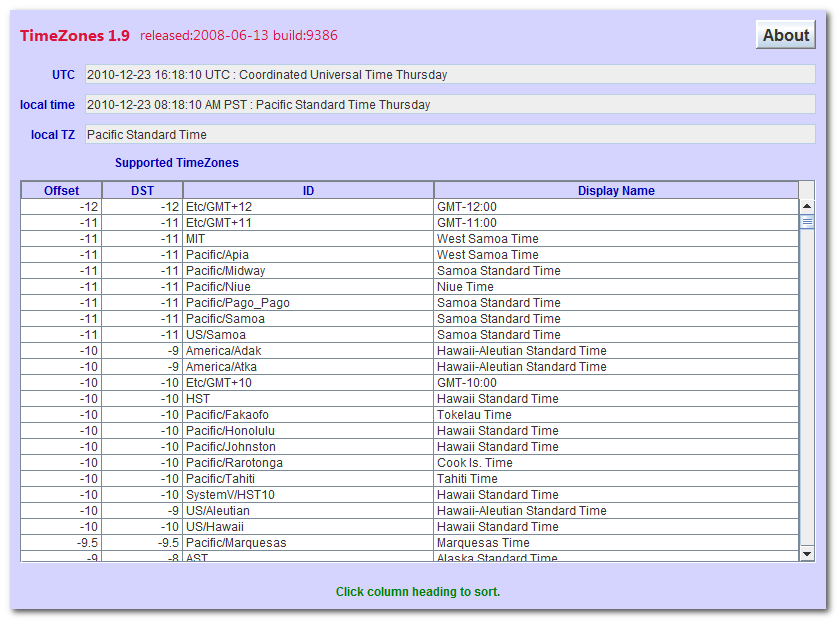
Here is a list of available time zones:
Standard : (DaylightSaving) : TimeZone
Here is a list of available TimeZones:
Java Requirements and Troubleshooting
TZ
is a Java Applet (that can also be run as an application)
to TimeZones.
You are welcome to install it on your own website.
If it does not work…
If Copy/Paste (Ctrl-C/Ctrl-V) do not work, you can turn them back on by
modifying your java.policy file. This is not for the novice or faint of heart. instructions
Your alternative is to download this program and run it without a browser.
In the Java Control Panel security tab,
click Start ⇒ Control Panel ⇒
Programs ⇒ Java ⇒ Security, configure medium security
to allow self-signed and vanilla unsigned applets to run.
If medium is not available, or if Java security is blocking you from running the program,
configure high security
and add http://mindprod.com
to the Exception Site List at the bottom of the security tab.
Often problems can be fixed simply by clicking the reload button on your browser.
Make sure you have both JavaScript and Java enabled in your browser.
Make sure the Java in your browser is enabled in the security tab of the Java Control panel.
Click Start ⇒ Control Panel ⇒
Programs ⇒ Java ⇒ Security ⇒
Enable Java Content in the browser.
This Java Applet (that can also be run as an application)
needs 32-bit or 64-bit Java 1.8 or later.
For best results use the latest 1.8.0_131 Java.
It works under any operating system that supports Java
e.g. W2K, XP, W2003, Vista, W2008, W7-32, W7-64, W8-32, W8-64, W2012, W10-32, W10-64, Linux, LinuxARM, LinuxX86, LinuxX64, Ubuntu, Solaris, SolarisSPARC, SolarisSPARC64, SolarisX86, SolarisX64 and OSX
You should see the Applet hybrid above looking much like this
screenshot.
If you don’t, the following hints should help you get it working:
Especially if this Applet hybrid has worked before, try clearing the browser cache and rebooting.
To ensure your Java is up to date, check with Wassup.
First, download it and run it as an application independent of your browser,
then run it online as an Applet to add the complication of your browser.
If the above Applet hybrid does not work,
check the Java console for error messages.
If the above Applet hybrid does not work, you might have better luck with the downloadable version available below.
If you are using Mac OS X and would like an improved Look and Feel,
download the QuaQua look & feel
from randelshofer.ch/quaqua.
UnZip the contained quaqua.jar
and install it in ~/Library/Java/Extensions
or one of the other ext dirs.
Upgrade to the latest version of Internet Explorer or another browser.
Click the Information bar, and then click Allow blocked content. Unfortunately, this also allows dangerous ActiveX code to run. However, you must do this in order to get access to perfectly-safe Java Applets running in a sandbox. This is part of Microsoft’s war on Java.
Try upgrading to a more recent version of your browser,
or try a different browser e.g. Firefox, SeaMonkey, IE or Avant.
If you still can’t get the program working
click the red HELP button below for more detail.
If you can’t get the above Applet hybrid working
after trying the advice above and from the red HELP button below,
have bugs to report or ideas to improve the program or its documentation,
please send me an email at.
Add column 1 in hours to UTC
to get local standard time.
Add column 2 in hours to UTC to get local daylight saving time.
Use UTC
when you want no time zone at all.
Use Asia/Riyadh for Arabia Standard Time. Asia/Riyadh87, Asia/Riyadh88
and Asia/Riyadh89 are 3 hours and 7 minutes east of UTC. This is the offset used in 1987 to 1989. Actually it was 3 hours 7 minutes and 4 seconds to approximate solar time. Prior to 1950 they used 3:06:52. In the period 1951— 1986 and 1990 onward they used a simple 3 hour difference. In Islamic tradition, the day starts at sunset.
Note how much many aliases there are for the same time zone. I speculate there are two reasons for this:
To anticipate some geographical region adopting a quirky daylight saving rule in future. There would be no need adjust to a new split time zone to adopt the new rule. Only the tables
built into Java would need to be adjusted.
It makes it easier for people to find their own time zone. They need find only a nearby city without having to consult a map to find a distant city on the same longitude. Often they can
find their own city directly.
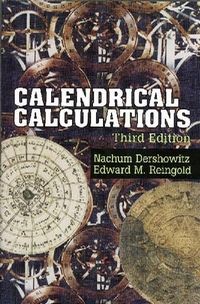
How to compute solstices, equinoxes, new moons, Western, Chinese and Muslim holidays. Has been reissued several times. Make sure you get the most recent edition.
Sun is going to try redesigning Date/Time a third time, in Java 1.7, this time based on Joda Time, so you can also have
dates without times (like BigDate), times without dates,
intervals…
You need to use quite a few different classes to solve even a simple problem
involving dates. Examine the
Please read the feedback from other visitors,
or send your own feedback about the site. Contact Roedy.
Please feel free to link to this page without explicit permission.
Canadian
Mind
Products
IP:[65.110.21.43]
Your face IP:[216.73.216.213]


 Calendar
 .
. Get New Java
Get New Browser
Get New Java
Get New Browser