


| Introduction | Books |
| Kindle Coverage | Links |
| Kindle Formats |
A wireless device for reading electronic books. It uses a high contrast display that looks much like ink on paper. However, the contrast is not nearly as high as the competing Kobo and Sony eBook readers. I have not seen it side by side with a Nook.
Kindle already makes up a whopping 12% of the book sale market of titles also available in Kindle form. Last revised/verified: 2009-02-22
The first things that struck me when I first saw a pair of Kindles was:
Kindles are a loss leader to sell eBooks. Kindles cost Amazon roughly twice what they sell them for.
These Kindles are in ascending order by list price. This approximates the order of street price. Amazon insists I not display prices, fearing they will be obsolete and because for some reason the prices they post on their website do not match the ones they post in the AWS (Amazon Web Services) database I use. You can find out the prices by clicking through to the Amazon site. The 9.5” Fires are obsolete, replaced by a smaller 7” model.
Amazon has simplified the black and white Kindle line to three models:
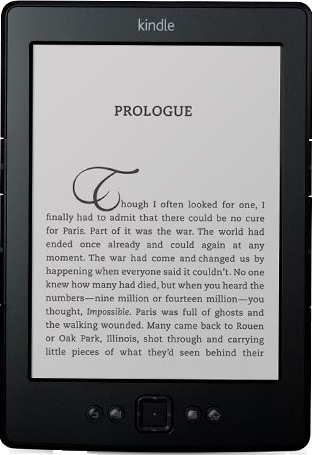 |
recommend electronic⇒Kindle Basic | |||||||||||||||||||||||||||||||||||||||||||||
| asin | B007HCCNJU | |||||||||||||||||||||||||||||||||||||||||||||
|---|---|---|---|---|---|---|---|---|---|---|---|---|---|---|---|---|---|---|---|---|---|---|---|---|---|---|---|---|---|---|---|---|---|---|---|---|---|---|---|---|---|---|---|---|---|---|
| dim | 9.10 × 12.20 cm 3.58 × 4.80 in | |||||||||||||||||||||||||||||||||||||||||||||
 | ||||||||||||||||||||||||||||||||||||||||||||||
| Basic model in black or grey. Wireless device for reading eBooks, 16 grey levels, Requires WiFi or USB access. Controlled by wiggling button. diagonal: 15.2 cm, 6.00 inches, width × height 600 × 800 pixels. | ||||||||||||||||||||||||||||||||||||||||||||||
| ||||||||||||||||||||||||||||||||||||||||||||||
| Greyed out stores probably do not have the item in stock | ||||||||||||||||||||||||||||||||||||||||||||||
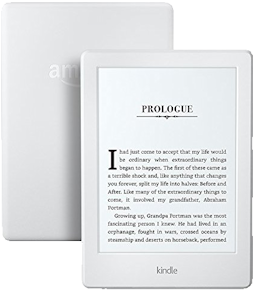 |
recommend electronic⇒Kindle E-reader, White | |||||||||||||||||||||||||||||||||||||||||||||
| asin | B017JG41PC | |||||||||||||||||||||||||||||||||||||||||||||
|---|---|---|---|---|---|---|---|---|---|---|---|---|---|---|---|---|---|---|---|---|---|---|---|---|---|---|---|---|---|---|---|---|---|---|---|---|---|---|---|---|---|---|---|---|---|---|
| dim | 16 × 11½ × 0.91 cm 6.30 × 4.53 × 0.36 in | |||||||||||||||||||||||||||||||||||||||||||||
| 6" Glare-Free Touchscreen Display, Wi-Fi, Includes Special Offer. Lighter and thinner than previous design. Uses less power. Released 2016-07-07. | ||||||||||||||||||||||||||||||||||||||||||||||
| ||||||||||||||||||||||||||||||||||||||||||||||
| Greyed out stores probably do not have the item in stock | ||||||||||||||||||||||||||||||||||||||||||||||
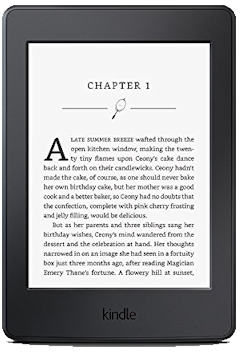 |
recommend electronic⇒Kindle Paperwhite | |||||||||||||||||||||||||||||||||||||||||||||
| asin | B00OQVZDJM | |||||||||||||||||||||||||||||||||||||||||||||
|---|---|---|---|---|---|---|---|---|---|---|---|---|---|---|---|---|---|---|---|---|---|---|---|---|---|---|---|---|---|---|---|---|---|---|---|---|---|---|---|---|---|---|---|---|---|---|
| dim | 17.02 × 11.68 × 0.91 cm 6.70 × 4.60 × 0.36 in | |||||||||||||||||||||||||||||||||||||||||||||
| 6" High-Resolution Display (300 ppi) with Built-in Light, Wi-Fi, 4Gb. Supports the following formats: Kindle Format 8 (AZW3), Kindle (AZW), TXT, PDF, unprotected MOBI, PRC. There is also a model that has free 3G download of books as well as WiFi. | ||||||||||||||||||||||||||||||||||||||||||||||
| ||||||||||||||||||||||||||||||||||||||||||||||
| Greyed out stores probably do not have the item in stock | ||||||||||||||||||||||||||||||||||||||||||||||
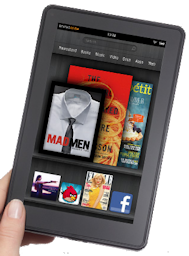 |
recommend electronic⇒Kindle Fire 7” 3G | |||||||||||||||||||||||||||||||||||||||||||||
| asin | B0051VVOB2 | |||||||||||||||||||||||||||||||||||||||||||||
|---|---|---|---|---|---|---|---|---|---|---|---|---|---|---|---|---|---|---|---|---|---|---|---|---|---|---|---|---|---|---|---|---|---|---|---|---|---|---|---|---|---|---|---|---|---|---|
| dim | 9 × 15.30 cm 3.54 × 6.02 in | |||||||||||||||||||||||||||||||||||||||||||||
| This product is not in stock at any of the Amazon stores. Older model. Wireless device for reading eBooks with 7” colour screen. Receive books via 3G cellphone towers. Coverage in 100 countries. Does not work with WiFi. Controlled by a touch screen. Like a low-end Apple iPad. It is an Android device that can run apps and games. Developers program it in Java. diagonal: 17.8 cm, 7.00 inches, 600 × 1024 pixels. | ||||||||||||||||||||||||||||||||||||||||||||||
| ||||||||||||||||||||||||||||||||||||||||||||||
| Greyed out stores probably do not have the item in stock | ||||||||||||||||||||||||||||||||||||||||||||||
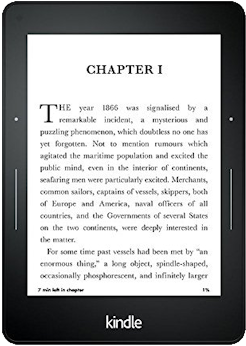 |
recommend electronic⇒Kindle Voyage, 6" | |||||||||||||||||||||||||||||||||||||||||||||
| asin | B00IOY8XWQ | |||||||||||||||||||||||||||||||||||||||||||||
|---|---|---|---|---|---|---|---|---|---|---|---|---|---|---|---|---|---|---|---|---|---|---|---|---|---|---|---|---|---|---|---|---|---|---|---|---|---|---|---|---|---|---|---|---|---|---|
| with Adaptive Built-in Light, PagePress Sensors (page button on either side). Hi res touch display. Wi-Fi, optional extra cost free (they mean bundled) 3G, includes ads (aka Special Offers). You can get rid of the ads for an extra $20. Requires a WiFi access to download books. 180 grams (lighter than the paperwhite). 300 ppi resolution display. Will not be in stock until 2016-10-25, delayed 3 months. | ||||||||||||||||||||||||||||||||||||||||||||||
| ||||||||||||||||||||||||||||||||||||||||||||||
| Greyed out stores probably do not have the item in stock | ||||||||||||||||||||||||||||||||||||||||||||||
Kindles used to work only in parts of the USA. Now they work world wide, wherever 3G cellphone coverage is advised. The Kindle holds enough books for a lifetime of reading, so you can load them up where there is coverage to read off in the jungle. With WiFi , the kindle will work anywhere in the world there WiFi is Internet access, e.g. Internet Cafés anywhere in the world. See eReader connectivity for details.
Kindle is quite limited in the formats of book it can display. It supports only ISO-8859-1 encoding, so has only limited support for non-English. It supports Mobipocket format (.MOBI, .PRC), plain text files, PDF and Amazon’s proprietary, copy-protected AZW format. eBook, Word, HTML (Hypertext Markup Language) etc. have to be converted before use. Kindles mostly use two Amazon proprietary formats, AZW and KF8 with copy protection.
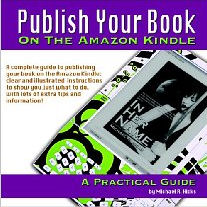 |
recommend book⇒Publish Your Book On The Amazon Kindle: A Practical Guide | |||||||||||||||||||||||||||||||||||||||||||||||||||||||
| by | Michael R. Hicks | 978-1-4404-5694-7 | paperback | |||||||||||||||||||||||||||||||||||||||||||||||||||||
|---|---|---|---|---|---|---|---|---|---|---|---|---|---|---|---|---|---|---|---|---|---|---|---|---|---|---|---|---|---|---|---|---|---|---|---|---|---|---|---|---|---|---|---|---|---|---|---|---|---|---|---|---|---|---|---|---|
| birth | 1963 age:54 | B001KYG5AY | kindle | |||||||||||||||||||||||||||||||||||||||||||||||||||||
| publisher | CreateSpace | |||||||||||||||||||||||||||||||||||||||||||||||||||||||
| published | 2008-11-14 | |||||||||||||||||||||||||||||||||||||||||||||||||||||||
| A practical guide to publishing your book for the Amazon Kindle. | ||||||||||||||||||||||||||||||||||||||||||||||||||||||||
| ||||||||||||||||||||||||||||||||||||||||||||||||||||||||
| Greyed out stores probably do not have the item in stock. Try looking for it with a bookfinder. | ||||||||||||||||||||||||||||||||||||||||||||||||||||||||
 |
This page is posted |
http://mindprod.com/bgloss/kindle.html |
Optional Replicator mirror
|
J:\mindprod\bgloss\kindle.html | |
 |
Please read the feedback from other visitors,
or send your own feedback about the site. Contact Roedy. Please feel free to link to this page without explicit permission. | |
| Canadian
Mind
Products
IP:[65.110.21.43] Your face IP:[216.73.217.37] |
| |
| Feedback |
You are visitor number | |


